
Data Tables: How to Build an Enterprise-Grade Data Display System
Ui Pirate
4 views · 30 min read
30 min read | 4 days ago
Stop rebuilding the same data table nineteen times. Build one enterprise data display system with sheet and card views, field priority, actions and nested data.
The "Please Stop Building the Same Table Nineteen Times" Edition
By Vishal Anand (Founder) & Syed Musuddiq (Head of Design), UI Pirate
Part of the Enterprise Product Systems series. Tutorial 02, after How to Build an Enterprise-Grade Design Token System.
Somewhere in your product right now, there is a table with 27 columns, a horizontal scrollbar the size of a toothpick, and a user quietly wondering if they're the problem.
They're not. Neither are you. And neither is the table.
Here's the sentence that starts most enterprise UI disasters: "Can we just add one more column?" Nobody says it with bad intentions. And nobody says it once. By column 27 you have a horizontal scroll, a mobile layout that looks like a ransom note, and three other tables in the same product solving the same problem in three completely different ways.
So here's the uncomfortable truth this whole ebook is built on: you don't have a table problem. You have a "we've built the same table nineteen times" problem.
The fix isn't a better table. It's realizing the table was never the thing to design.
The short answer (for the skimmers, we see you): an enterprise-grade data display system is one set of rules that decides how any record appears, as a dense Sheet View, a recognition-friendly Card View, an expandable record or a full detail page. It runs on a shared data model, a schema with field types and information priority (P0 to P3), shared query state, a tiered action system and a config-driven build. Real tables become configurations, not new inventions.
That's what we're building: the enterprise kind, the kind that survives growing schemas, nested data, four user roles, a mobile app and one very opinionated stakeholder who still wants "just one more column."
What the System Must Survive
Before designing anything, write down the stress test it has to live through:
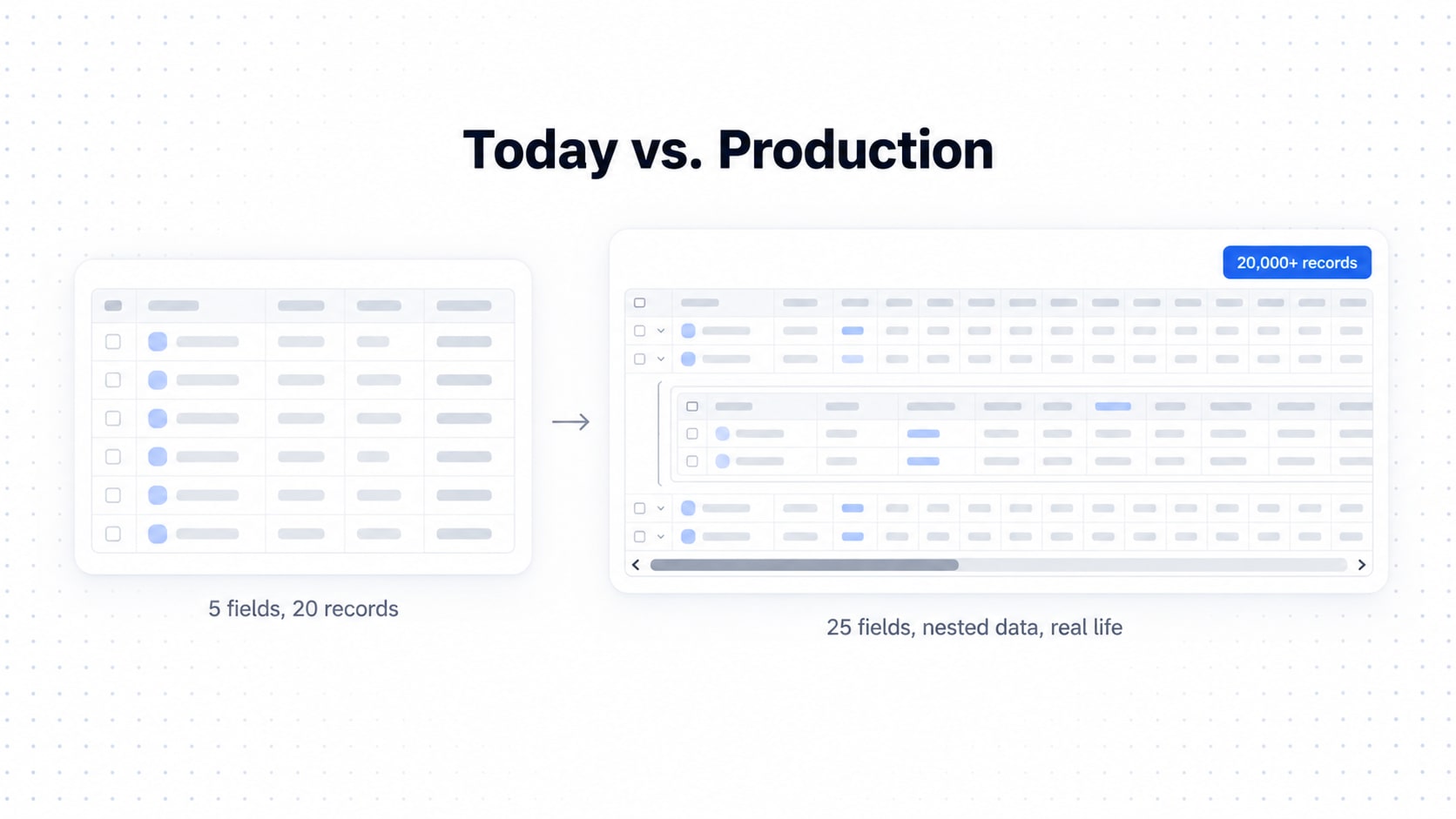
5 fields today → 25 fields later
short text → absurdly long text
people → companies → visits → devices → approvals
avatars → flags → chips → statuses → links
one row → expandable detail
20 records → 20,000+ records
different resources with completely different schemas
Sheet View ↔ Card View without redesigning each table
different user permissions
different record states
incomplete or missing data
nested relationships and child collections
If your table solves only today's visitor list, you built a screen. If it provides the rules for every table that comes after, you built a system.
What Is an Enterprise Data Display System?
Here's the mindset shift. If you take one thing from this ebook, take this:
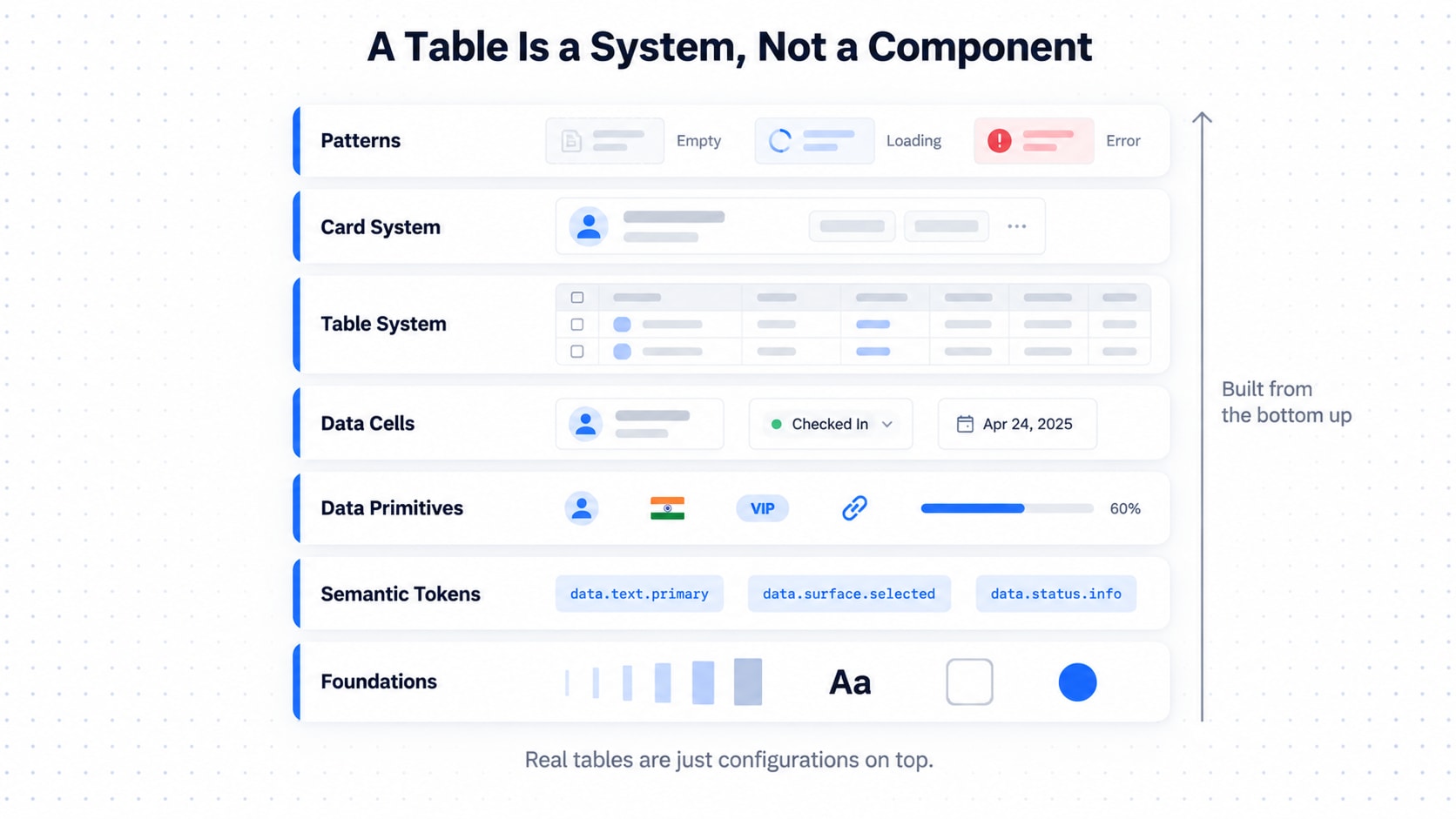
A table is not a component. A table is a configured data-display surface.
Instead of designing "the Visitors table," you design a system of layers, exactly like a good token system:
ENTERPRISE DATA DISPLAY SYSTEM
│
├── 01. Foundations
│   ├── Data primitives
│   ├── Spacing
│   ├── Typography
│   ├── Color
│   ├── Radius
│   ├── Borders
│   ├── Elevation
│   └── Iconography
│
├── 02. Semantic Data Tokens
│   ├── Primary data
│   ├── Secondary data
│   ├── Metadata
│   ├── Muted data
│   ├── Interactive data
│   ├── Status
│   ├── Warning
│   ├── Error
│   └── Success
│
├── 03. Data Primitives
│   ├── Text
│   ├── Number
│   ├── Date
│   ├── Date + Time
│   ├── Avatar
│   ├── Flag
│   ├── Icon
│   ├── Link
│   ├── Badge
│   ├── Chip
│   ├── Status
│   ├── Progress
│   └── Actions
│
├── 04. Data Cells
│   ├── Text Cell
│   ├── Person Cell
│   ├── Status Cell
│   ├── Date Cell
│   ├── Location Cell
│   ├── Tag Cell
│   ├── Link Cell
│   ├── Number Cell
│   ├── Mixed Cell
│   └── Custom Cell
│
├── 05. Table System
│   ├── Table Shell
│   ├── Toolbar
│   ├── Header
│   ├── Row
│   ├── Cell
│   ├── Selection
│   ├── Sorting
│   ├── Filtering
│   ├── Pagination
│   └── Actions
│
├── 06. Card System
│   ├── Record Card
│   ├── Identity
│   ├── Primary Fields
│   ├── Metadata
│   ├── Status
│   ├── Actions
│   ├── Expand
│   └── Details
│
└── 07. Data Display Patterns
    ├── Sheet View
    ├── Card View
    ├── Empty
    ├── Loading
    ├── Error
    ├── No Results
    ├── Selected
    └── Expanded
Same philosophy as tokens: set foundations, define meaning, build primitives, compose them into cells and views, and let products configure the system instead of inventing components. Real tables (Visitors, Devices, Companies) become configurations. It's the difference between a restaurant with a menu and a restaurant that rebuilds the kitchen every time someone orders.
Why Enterprise Tables Fail
A basic table assumes this:
Record → Row → ColumnsAn actual enterprise record looks like this:
Record
├── Identity
├── Organization
├── Status
├── Relationships
├── Dates
├── Location
├── Metadata
├── Permissions
├── Actions
├── Attachments
├── Nested records
└── Audit information
That's not a row. That's a small novel. And failure starts the second all of it gets equal visual weight, like a group chat where every message is in bold. You get:
horizontal scrolling that feels medieval
unreadable rows, inconsistent actions, too many icons doing nothing
duplicated information and unclear hierarchy
a mobile experience that's the desktop table, shrunk and sad
five card designs that are cousins who don't speak
missing data handled six ways (blank, dash, N/A, "null", and the occasional "undefined" that reached production)
tables that can't survive the next resource type
Notice what's not on the list: "the table wasn't pretty enough." And here's the real goal:
The goal is not to fit all the data into the UI. The goal is to expose the right information at the right level of detail for the user's current task.
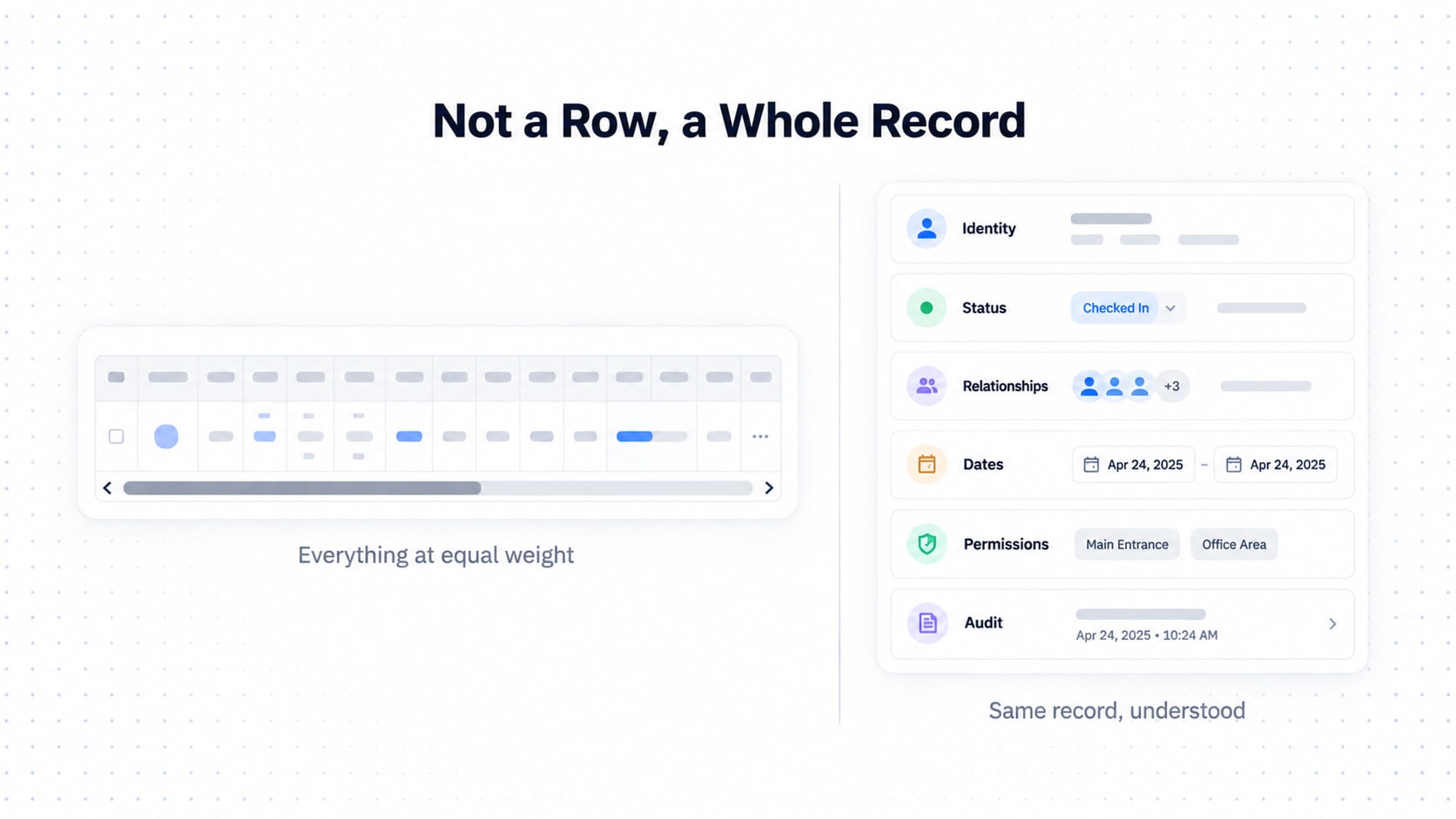
Table View vs List vs Card View
Different representations solve different problems. Picking the wrong one is like bringing a spreadsheet to a first date.
Pattern | Optimized for | Typical use |
|---|---|---|
Table / Sheet | Comparison | Admin, operations, bulk review |
List | Sequential scanning | Activity, messages, search results |
Card | Recognition | People, companies, resources |
Expanded Card | Context | Secondary information |
Detail Page | Investigation | Complete record management |
Sheet View is for comparing many records across the same fields: high density, predictable columns, minimal decoration, strong alignment, sorting, filtering, selection and bulk actions. Card View is for understanding records individually: strong identity, richer field rendering, avatars, flags, chips, grouped metadata, progressive disclosure.
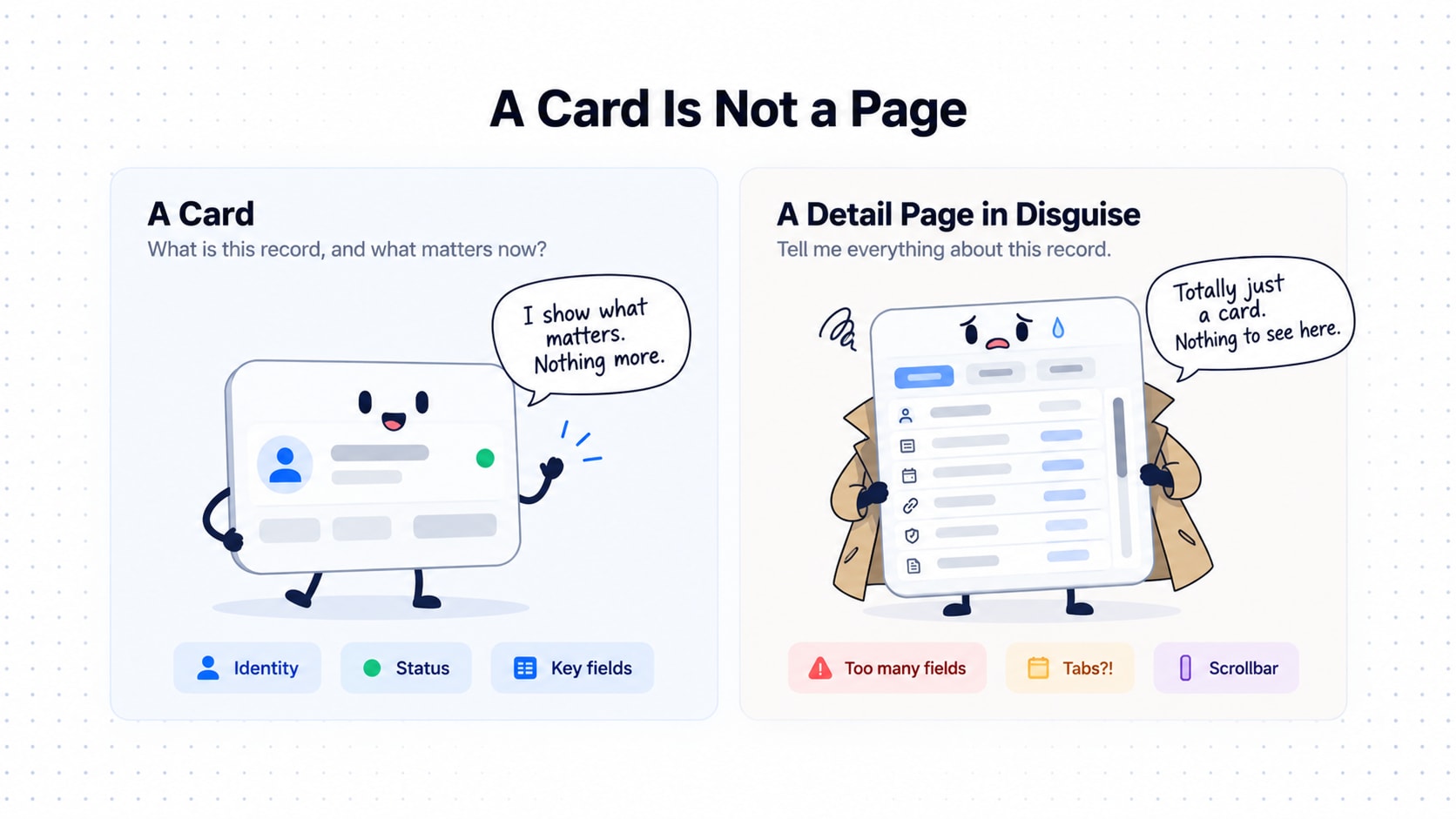
And the classic crime: a card is not a detail view. A card answers "what is this record and what matters right now?" A detail page answers "tell me everything." Once your card has 19 fields, three tabs and a scrollbar, you've built a page and put it in a trench coat..
The Central Architecture: One Data Model, Two Renderers
Here is the rule holding this entire ebook together:
Sheet View and Card View are not two independent systems. They are two renderers of the same data model.
Data + Schema + View Configuration + Renderer = UIThe same dataset must be able to render as this:
┌──────────────────────────┐
│ SHEET VIEW               │
│ Name | Company | Status  │
└──────────────────────────┘
or as this:
┌──────────────────────────────────────────────┐
│ [Avatar] John Smith              ● Checked In│
│          Acme Corporation                    │
│                                              │
│ Host       Sarah Williams                    │
│ Visit      Client Meeting                    │
│ Date       02 Oct · 10:30 AM                 │
│                                              │
│ View details                           ⋯     │
└──────────────────────────────────────────────┘
Same record, different renderer, like one person who is "Work You" in a meeting and "Family WhatsApp Group You" at 11pm.
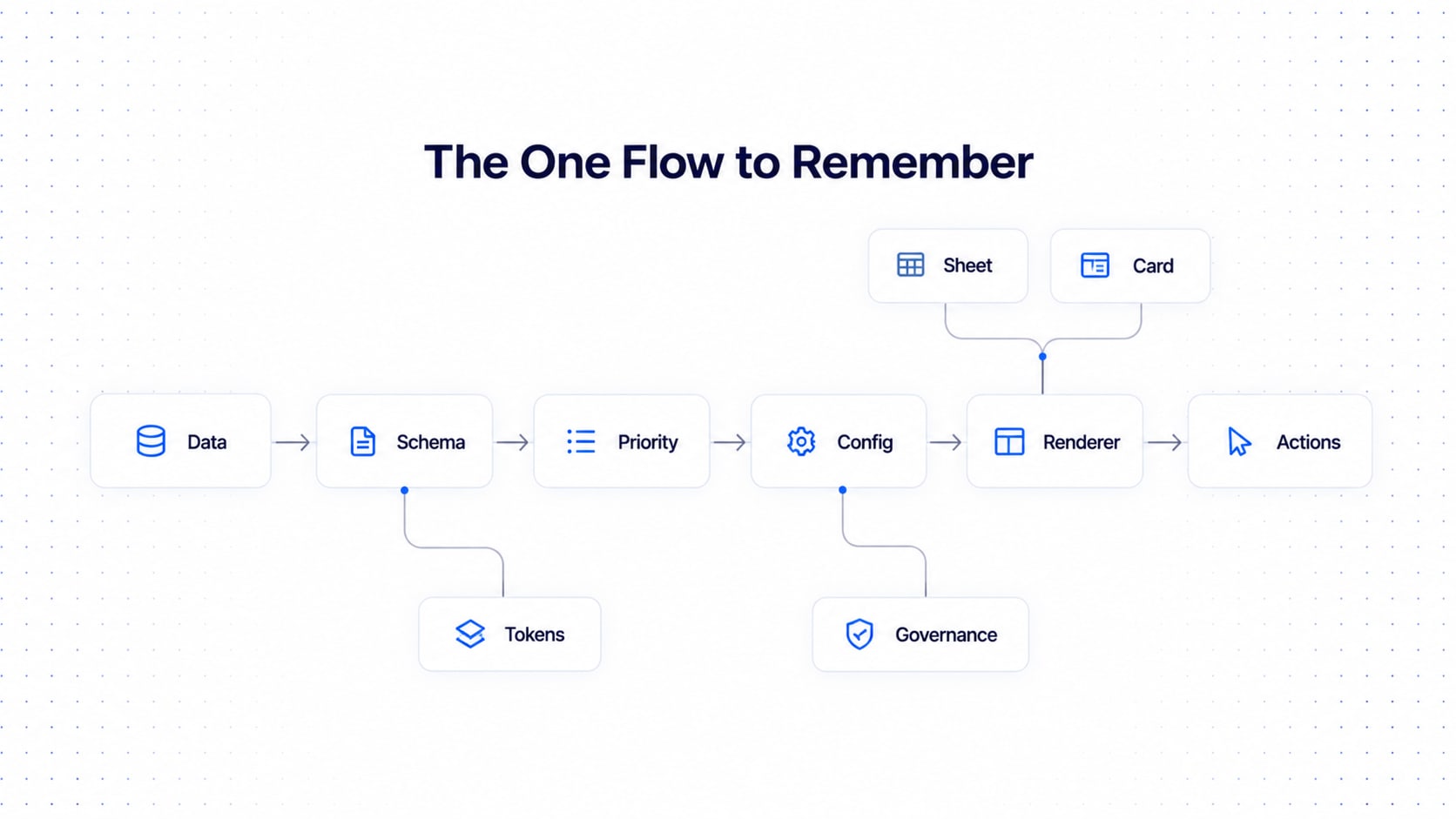
The full flow:
ENTERPRISE DATA
      ↓
 DATA MODEL
      ↓
   SCHEMA
      ↓
┌─────────────┬─────────────┬─────────────┐
│ FIELD TYPE  │  PRIORITY   │  BEHAVIOR   │
└─────────────┴─────────────┴─────────────┘
      ↓
VIEW CONFIGURATION
      ↓
┌──────────────────┬──────────────────┐
│  SHEET RENDERER  │  CARD RENDERER   │
│  Comparison      │  Recognition     │
│  Dense           │  Rich            │
│  Structured      │  Hierarchical    │
└──────────────────┴──────────────────┘
      ↓
USER ACTIONS
The same records then scale through four levels of detail:
Sheet View: dense, comparison-oriented, structured data
Card View: recognition-oriented, hierarchical, richer presentation
Expanded View: progressive disclosure of secondary and extended information
Detail View: complete investigation, when the card is no longer enough
This prevents the most expensive mistake in enterprise UI:
VisitorTable
EmployeeTable
DeviceTable
CompanyTable
as four completely separate UI systems. Instead:
EnterpriseDataView
        +
     Schema
        +
ViewConfiguration
One engine. Many configurations. Fewer 2am bug reports.

Shared Query State: The Workspace Owns the Query
Where do search, filters, sort and selection live?
Wrong answer: inside the table.
Right answer: in the data workspace.
The renderer just consumes it.
Dataset
  ↓
Search
  ↓
Filters
  ↓
Sort
  ↓
Selection
  ↓
Pagination
  ↓
Renderer
  ├── Sheet
  └── Card
So this must just work:
Select 12 records
      ↓
Switch Sheet → Card
      ↓
12 records remain selected
Same for search, filters, sort and page context. If the app forgets everything like a goldfish, that isn't a view switch, it's a factory reset.
Give it a first-class config object, DataViewConfig:
DataViewConfig
├── resource
├── view
├── density
├── visibleFields
├── fieldOrder
├── fieldPriority
├── sort
├── filters
├── selection
├── pagination
└── actions
And the view structure around it:
DataView
│
├── DataSource
│
├── Query State
│   ├── Search
│   ├── Filters
│   ├── Sort
│   ├── Pagination
│   └── Selection
│
└── Renderer
    ├── SheetRenderer
    └── CardRenderer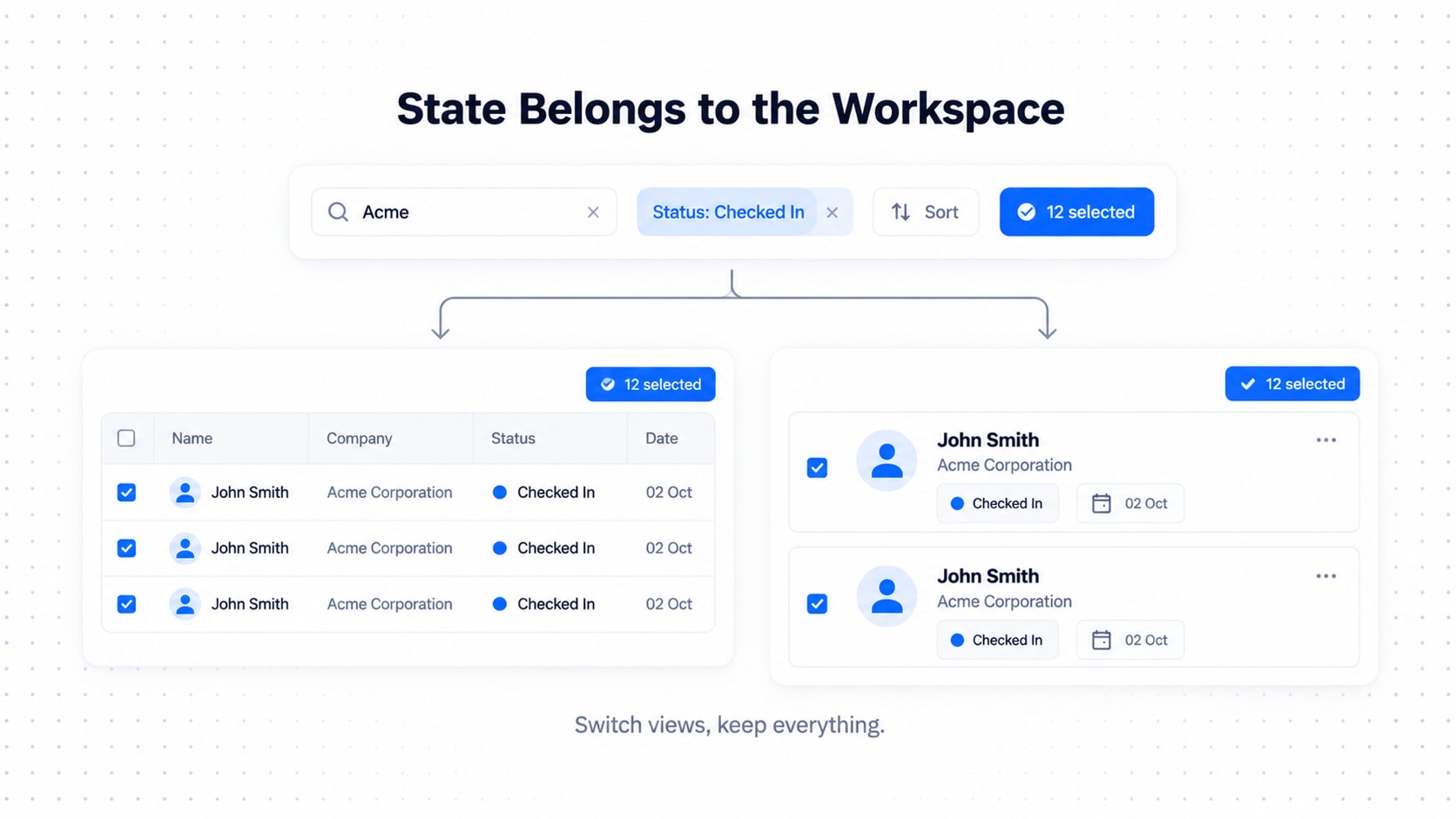
Data Tokens for Tables (Yes, Tokens Again)
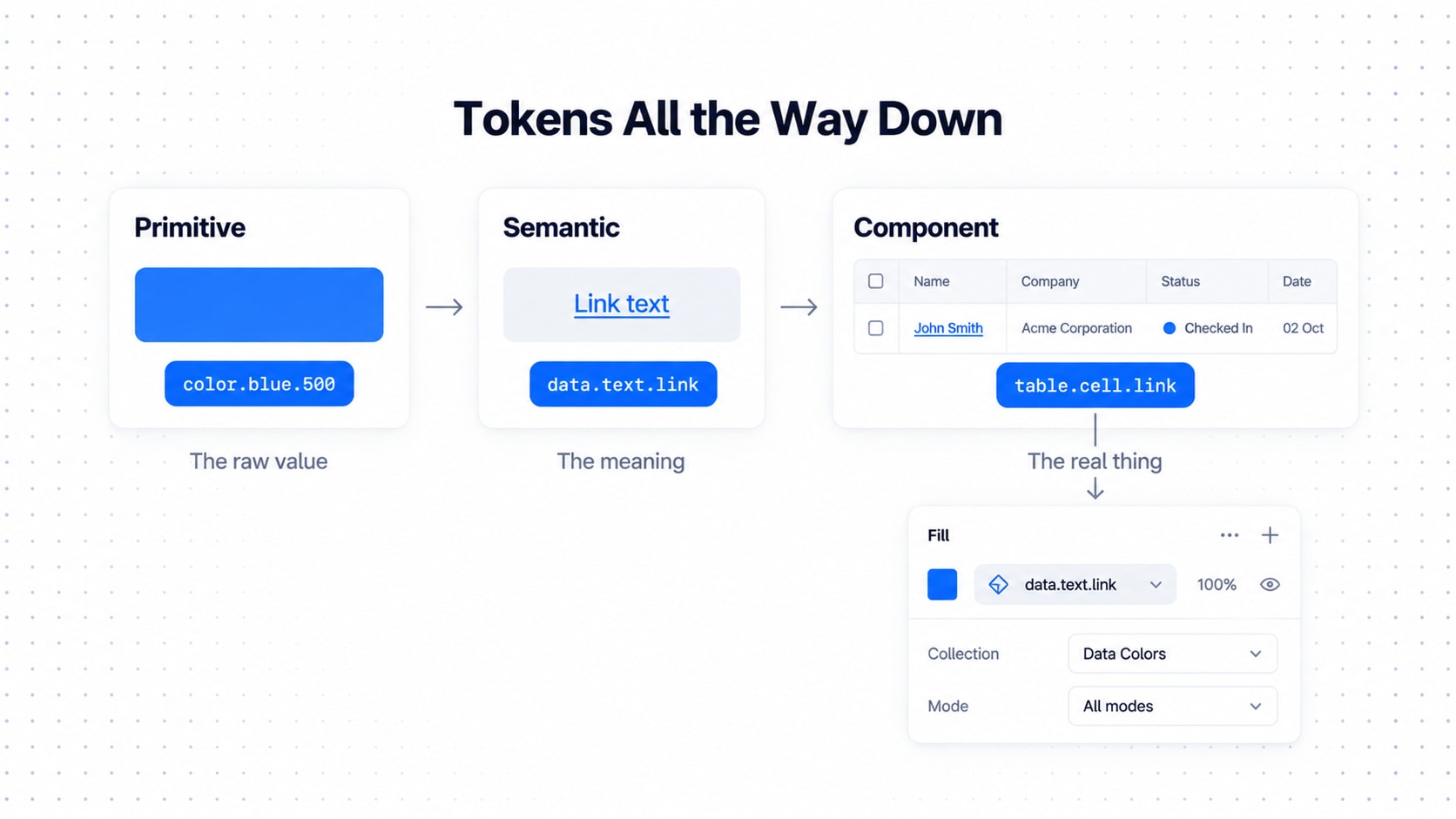
Same three layers as always, new costume. If you haven't read it yet, our full guide on how to build an enterprise-grade design token system covers the foundations this ebook runs on: primitive, semantic and component tokens, aliases, themes, multi-brand setups and governance. Read it first or after, but read it.
Primitive tokens (raw ingredients):
color.blue.500
color.gray.100
spacing.100
spacing.200
spacing.300
radius.sm
radius.md
font.size.sm
font.size.md
Semantic tokens (what the value is for):
data.text.primary
data.text.secondary
data.text.muted
data.text.link

data.surface.default
data.surface.hover
data.surface.selected

data.border.default
data.border.subtle

data.status.success
data.status.warning
data.status.error
data.status.info
The semantic tokens are the categories of meaning your data can carry: primary data, secondary data, metadata, muted data, interactive data, and status (with its success, warning and error flavors).
Component tokens (closest to the UI):
table.header.height
table.row.height
table.cell.padding.x
table.cell.padding.y

card.padding
card.gap
card.radius

record.summary.gap
record.details.gap
record.action.size
Why bother? Because when someone says "can we make everything denser," the answer is a token change, not a three-week redesign of nineteen tables. Same for branding and accessibility.
Data Primitives and Field Types: Build the Vocabulary First
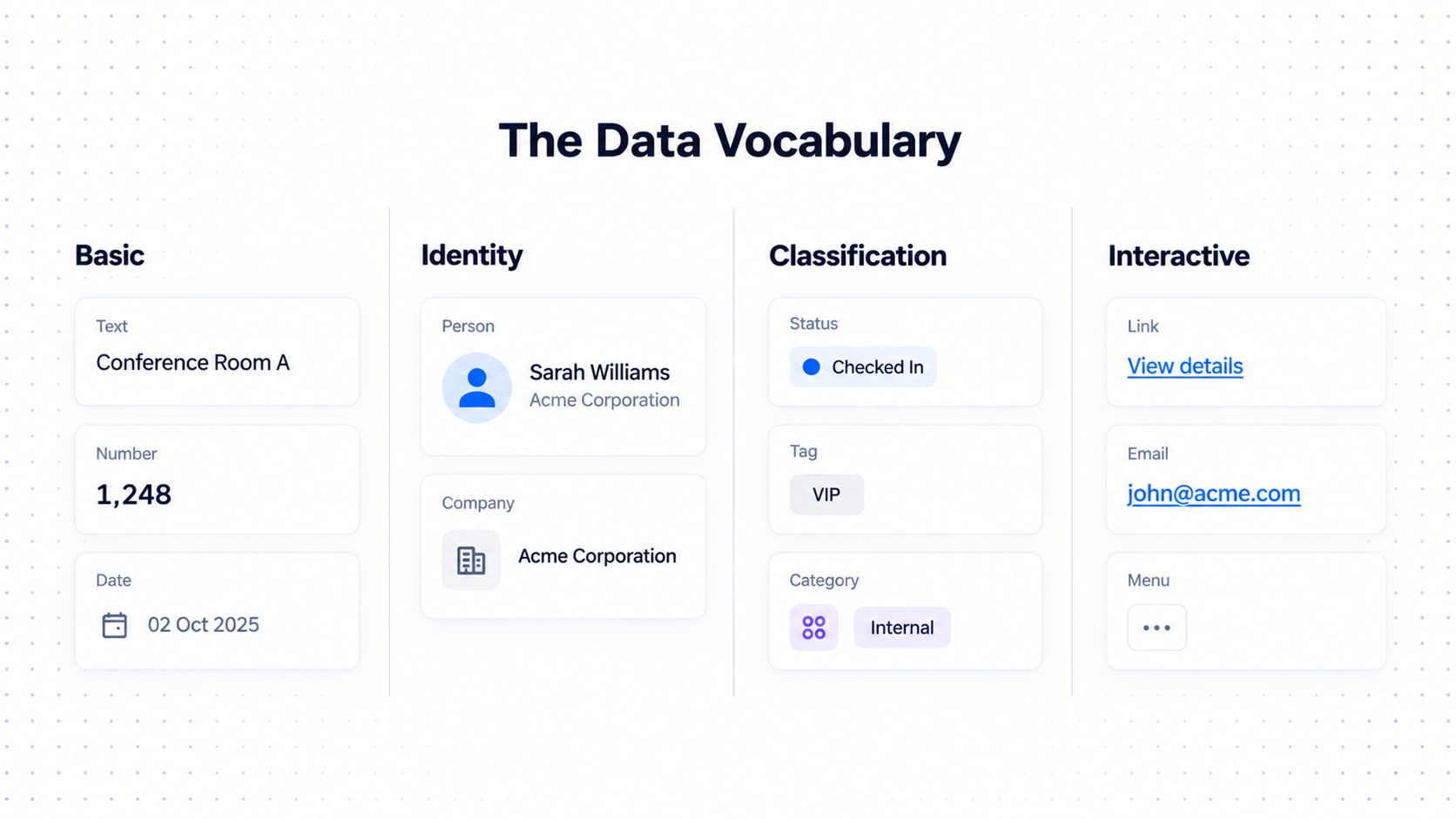
Before you build a table, build the vocabulary. You wouldn't write a novel before learning the alphabet (some roadmaps clearly tried).
Basic: Text, Number, Currency, Percentage, Boolean, Date, Time, DateTime
Identity: Person, Company, Organization, Team, Avatar
Location: Country, City, Address, Building, Floor, Room
Classification: Status, Tag, Category, Priority, Type
Interactive: Link, Email, Phone, URL, Action, Menu
Rich content: Image, Document, Attachment, Icon, Progress, Rating
Composite fields:
Avatar + Name
Person + Company
Flag + Country
Status + Timestamp
Icon + Label
Composite fields are where the magic happens, and where designers get overexcited (see the decorative-icon rule coming up).
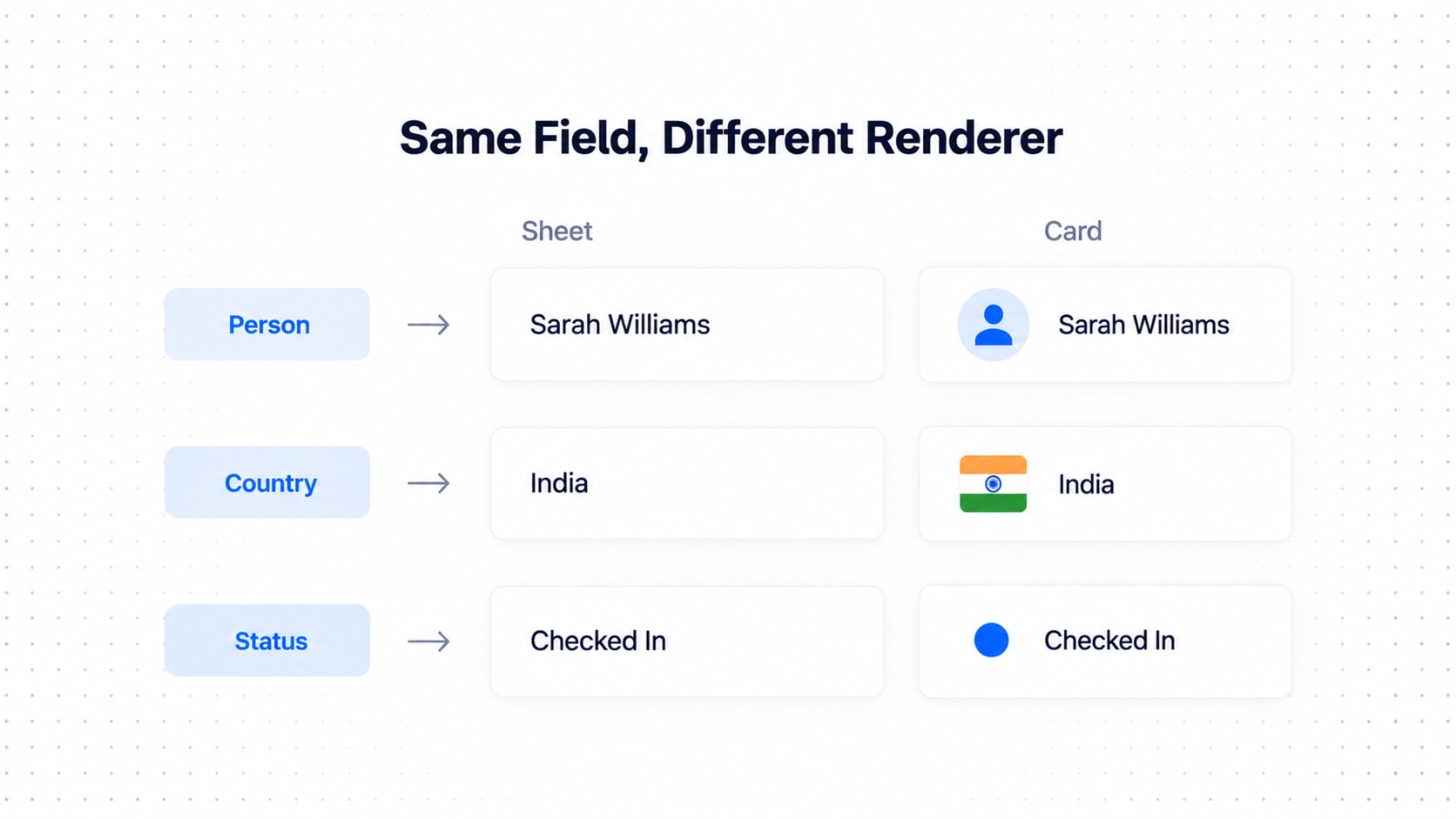
Field types are not presentations
A field's data type should not dictate one visual treatment.
Country
  ↓
COUNTRY field type
  ↓
Sheet: India
Card: 🇮🇳 IndiaHost
↓
PERSON field type
↓
Sheet: Sarah Williams
Card: [Avatar] Sarah WilliamsStatus
↓
STATUS field type
↓
Sheet: Checked In
Card: ● Checked InThree compositional levels:
Data Primitive
      ↓
Data Cell
      ↓
View Renderer
Every field gets a proper definition, no vibes allowed:
{
  "key": "host",
  "label": "Host",
  "type": "person",
  "priority": "P2",
  "sortable": true,
  "filterable": true,
  "searchable": true,
  "interactive": true
}
A field should also know its sheetVisibility, cardVisibility and renderer.
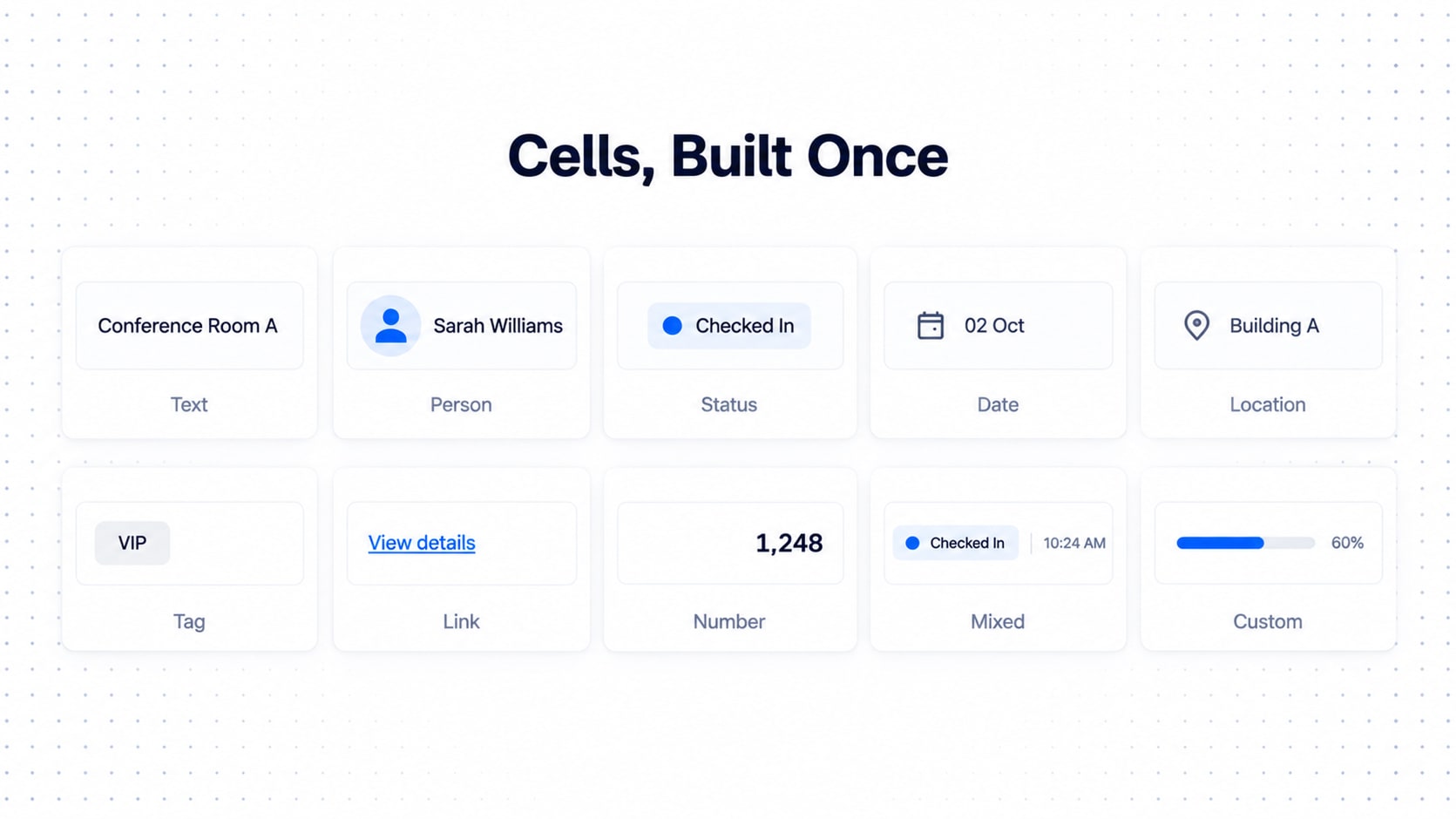
Data Cells: Primitives Get a Job
Primitives are single ingredients. Data cells are the prepared dishes: reusable units that both renderers consume.
Text Cell
Person Cell
Status Cell
Date Cell
Location Cell
Tag Cell
Link Cell
Number Cell
Mixed Cell
Custom Cell
A Person Cell knows how to show an avatar, a name and maybe a company line. A Status Cell shows an indicator plus a label. A Mixed Cell combines primitives (status + timestamp). A Custom Cell is the escape hatch for the weird one-off, built from the same primitives instead of from scratch.
That's why a new resource doesn't need a new design sprint. The cells already exist; you're just choosing which ones to use.
Anatomy of an Enterprise Data Workspace
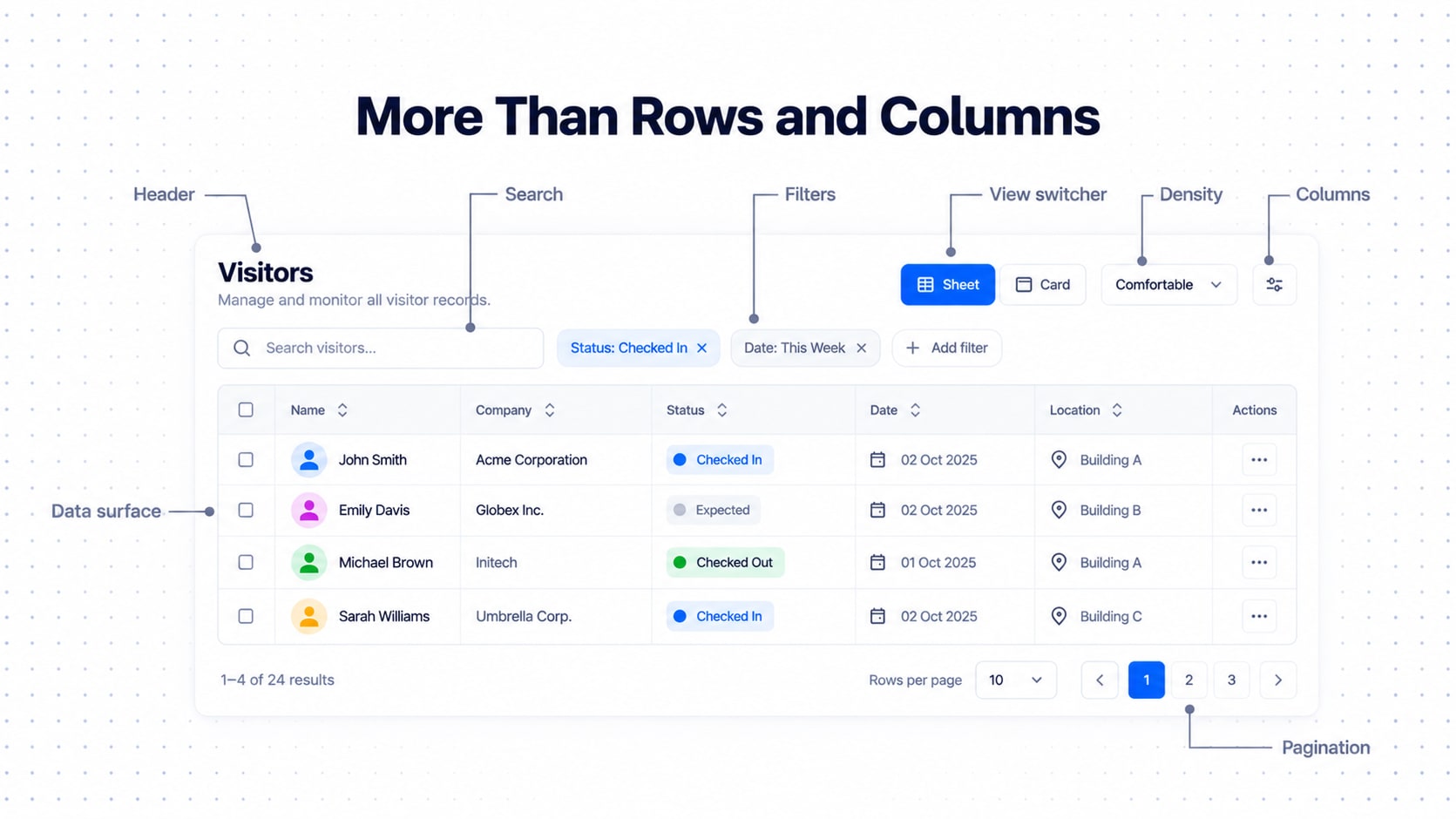
A real data screen has far more than rows and columns:
Data Workspace
├── Page Header
├── Search
├── Filters
├── Active Filters
├── View Switcher
├── Density Control
├── Column Configuration
├── Selection / Bulk Actions
├── Data Surface
│   ├── Header
│   ├── Rows / Cards
│   └── Expansion
└── Footer
    ├── Result Count
    ├── Page Size
    └── Pagination
And the toolbar rule: don't put every control in the primary toolbar. Prioritize:
Search
Most common filters
View switcher
Primary action
Secondary controls
Configuration
Everything else lives in overflow. The toolbar is not a junk drawer.
Sheet View: Data Table UX for Comparison
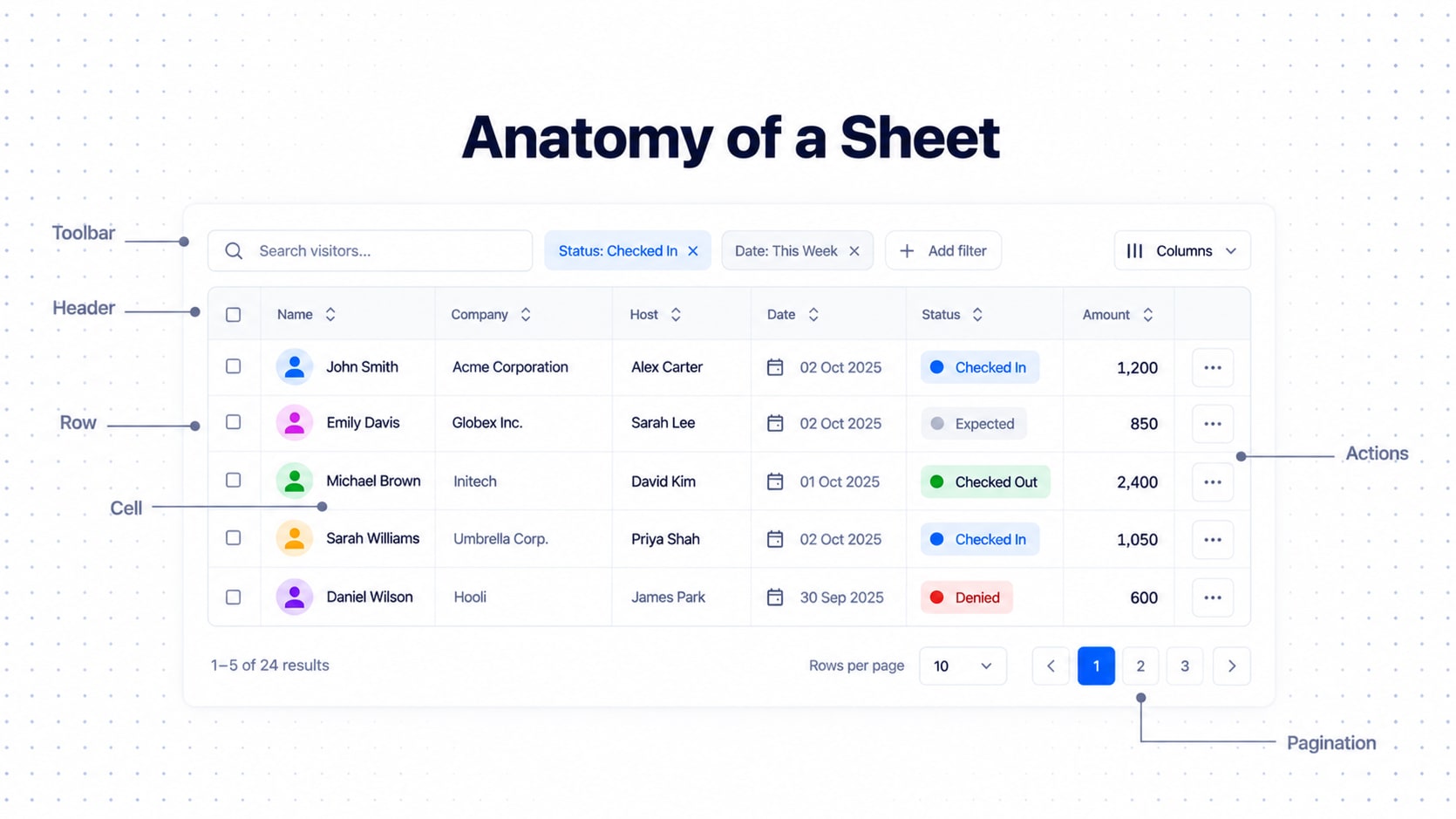
Sheet View exists for comparison: scanning across many records and spotting the difference. Keep the visual language restrained. It should feel like a reliable information surface, not a carnival.
Prefer: normal text, clear alignment, consistent number formatting, restrained status indicators, links in the interactive color, predictable column widths, compact density.
Avoid: decorative icons everywhere, unnecessary chips, oversized avatars, excessive color, inconsistent cell layouts.
Data | Alignment |
|---|---|
Text | Left |
Person | Left |
Date | Left or right, depending on the system |
Number | Right |
Currency | Right |
Status | Left |
Actions | Right |
The rule is consistency. A table where numbers randomly align left, right and center isn't expressive, it's a hostage note. Give every column a minimum, preferred and maximum width, so long content never destroys the table like one guest standing in a doorway at a party.
Card View: The Recognition Mode
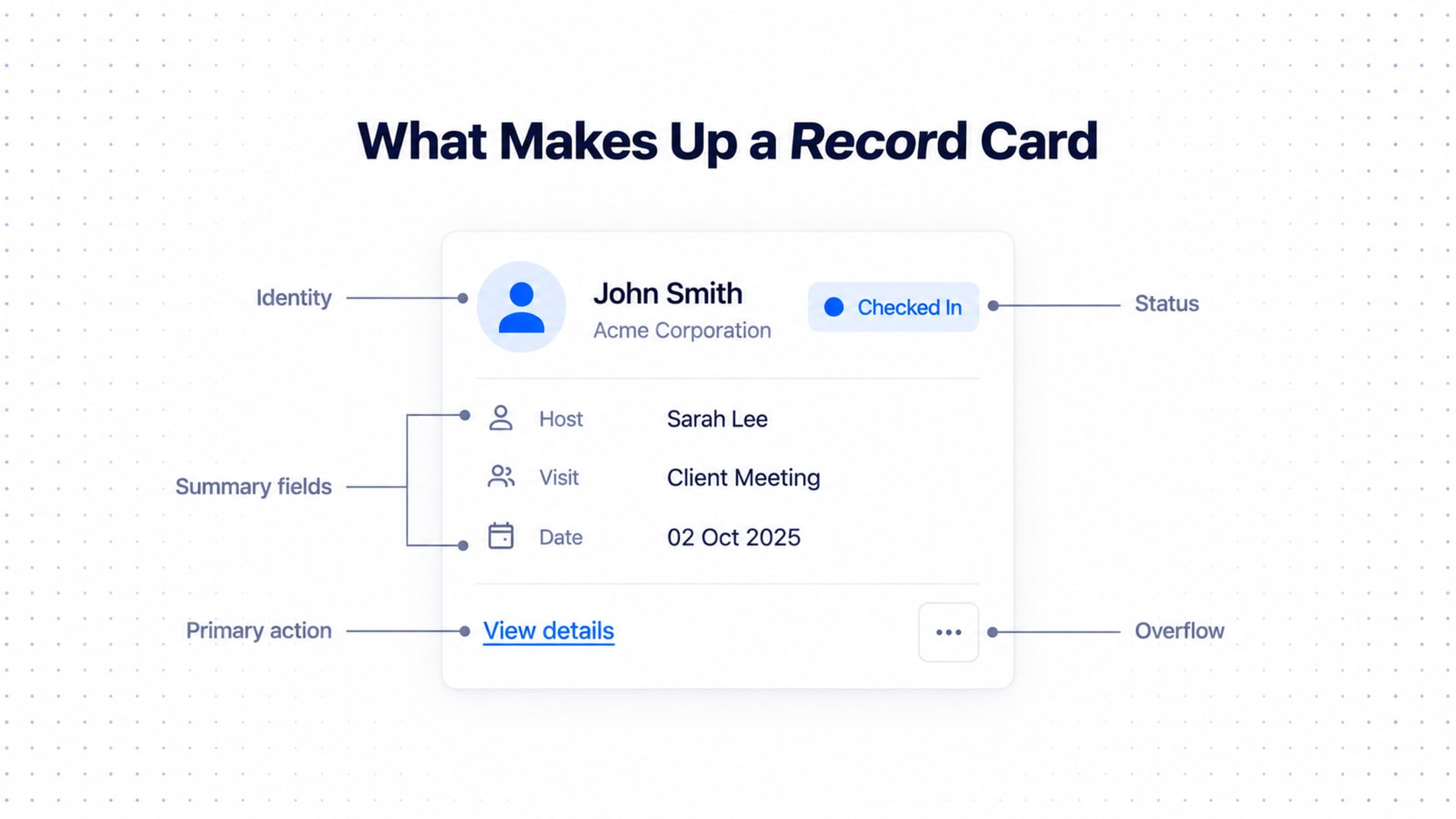
A good card answers four questions, in order:
What is this record?
What is its current state?
What is the most important context?
What can I do with it?
┌──────────────────────────────────────────────┐
│ [Avatar] John Smith            ● Checked In  │
│          Acme Corporation                    │
│                                              │
│ Host       Sarah Williams                    │
│ Visit      Client Meeting                    │
│ Date       02 Oct · 10:30 AM                 │
│                                              │
│ View details                           ⋯     │
└──────────────────────────────────────────────┘
Cards can be richer than rows: avatars, flags, chips, status indicators, grouped metadata, stronger hierarchy. But here's the rule that separates adults from interns:
Richness must be semantic, not decorative.
A flag communicates a country. An avatar communicates identity. A status indicator communicates state. An icon next to every field "because the card looks empty" is not design, that's panic with a stroke width.
So the two views get deliberately different visual languages: Sheet is information-first, Card is recognition plus context. Same data, different personality, same rules underneath.
Information Priority (P0 to P3): The Secret Sauce
This is what lets one system handle a table with 4 fields and one with 25 without a breakdown. Every field gets a priority, as part of the data model, not a visual afterthought.
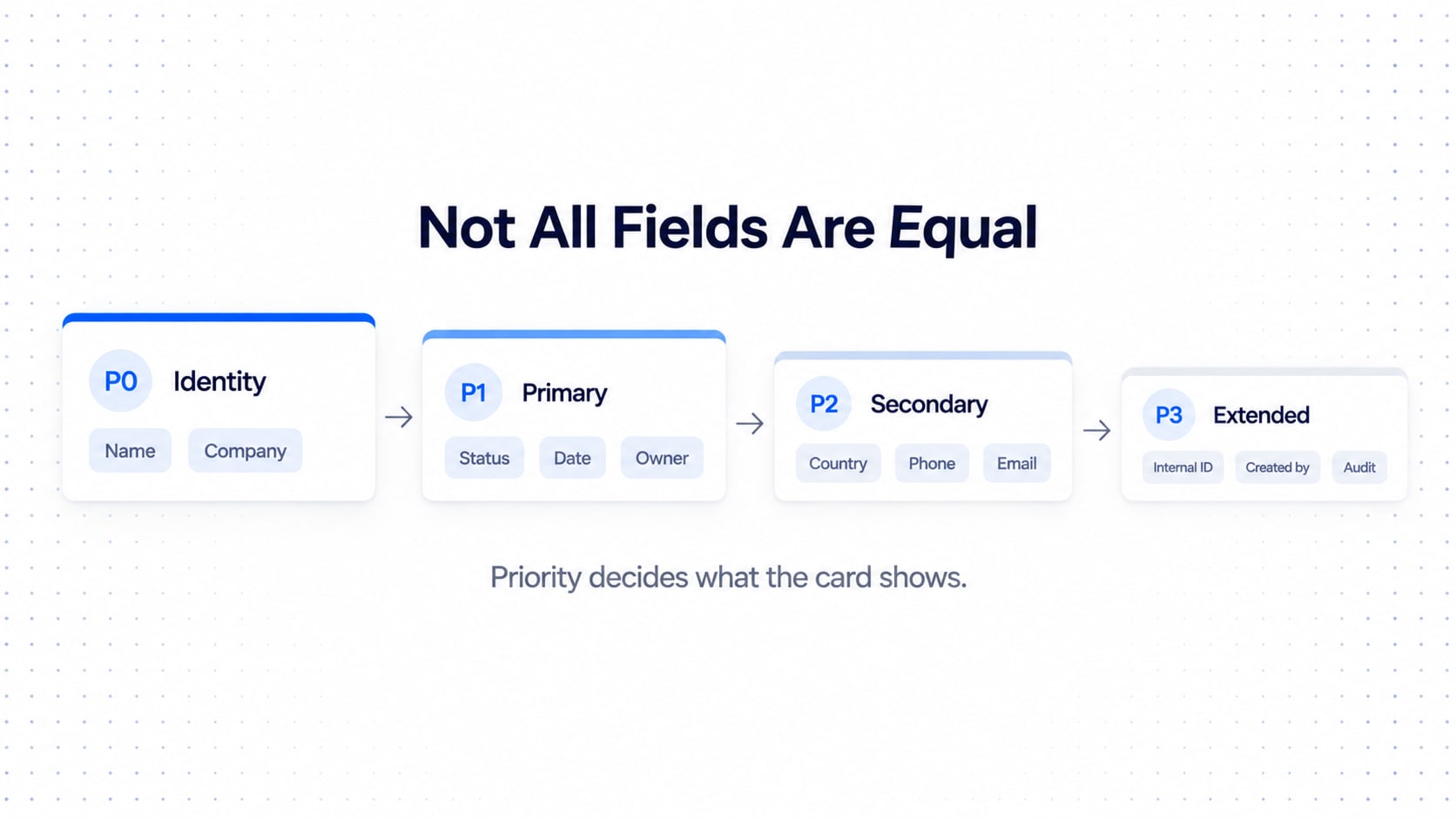
P0 — Identity
P1 — Primary
P2 — Secondary
P3 — Extended
P0 Identity: what is the record? Name, title, company, primary identifier. Always visible.
P1 Primary: what matters while scanning? Status, date, owner, visit type, location. Normally visible.
P2 Secondary: useful support. Country, phone, email, department, host. Visible when space and context justify it.
P3 Extended: useful for investigation. Internal ID, created by, modified by, audit metadata. Normally inside expansion.
Think newspaper: headline (P0), lede (P1), body (P2), and the fine print nobody reads unless something went wrong (P3).
The Card Layout Algorithm
Please, for the love of all that is holy, do not use this rule:
"Always show the first four columns."
It fails with two fields. It fails with twenty-five. It fails when the first four columns are Created By, Modified By, Internal ID and Row Number.
Use this:
1. Always show P0.
2. Add the highest-value P1 fields.
3. Add P2 fields only when they improve recognition.
4. Respect the available card width.
5. Move remaining fields into Details.
6. If no fields are hidden, do not render an expansion control.P0
+
High-value P1
+
Selected P2
↓
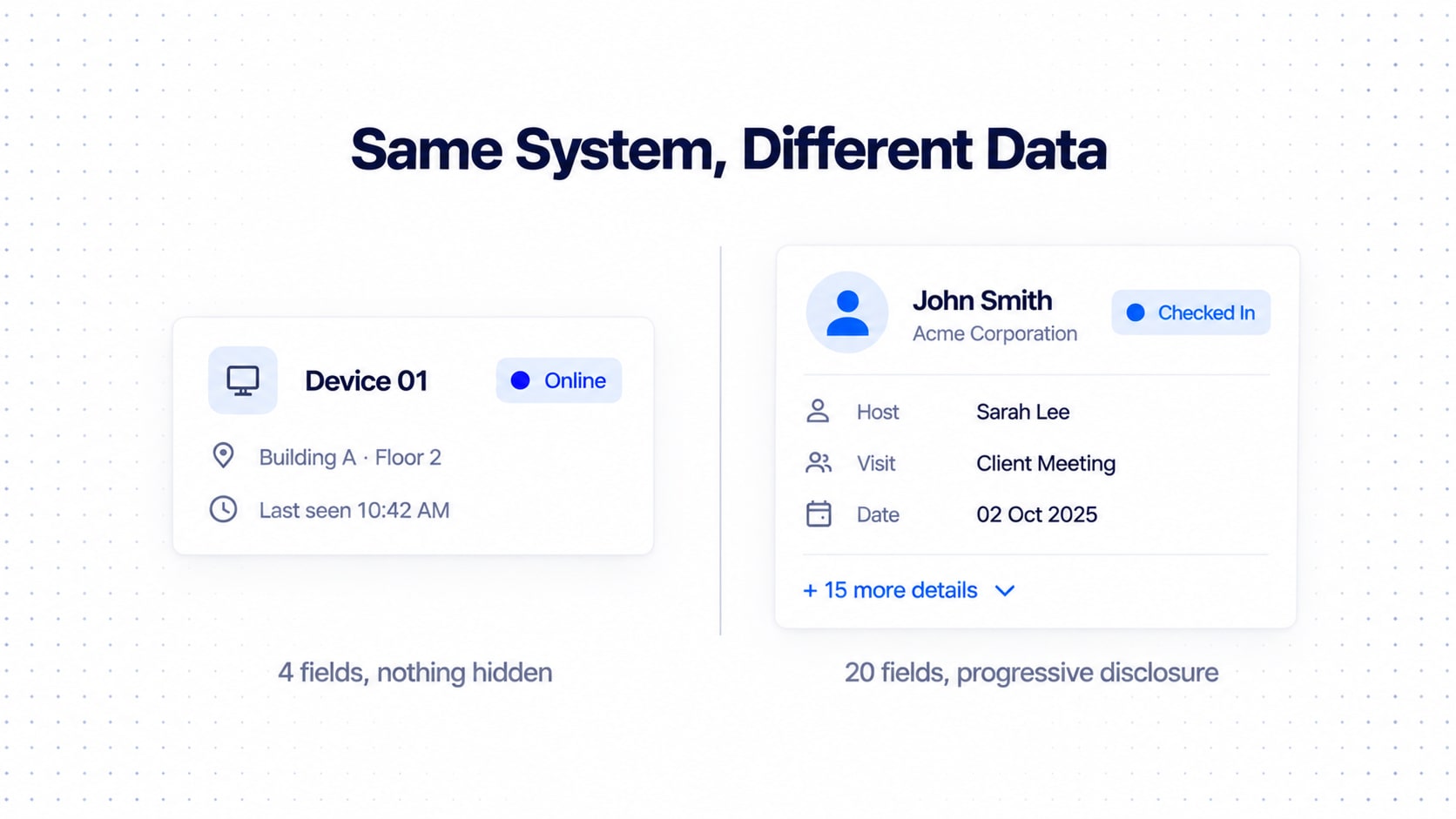
Collapsed CardFour-field dataset (Name, Company, Status, Date): show all four. Don't invent a "Show more" with nothing behind it. That's a door painted on a wall.
Twenty-field dataset: the collapsed card shows Name, Company, Status, Date, Host, then:
+ 15 more detailsThe expanded state reveals the rest. The card is driven by information priority and available space, not a number someone picked in a meeting.
Expandable Records: Progressive Disclosure Done Right
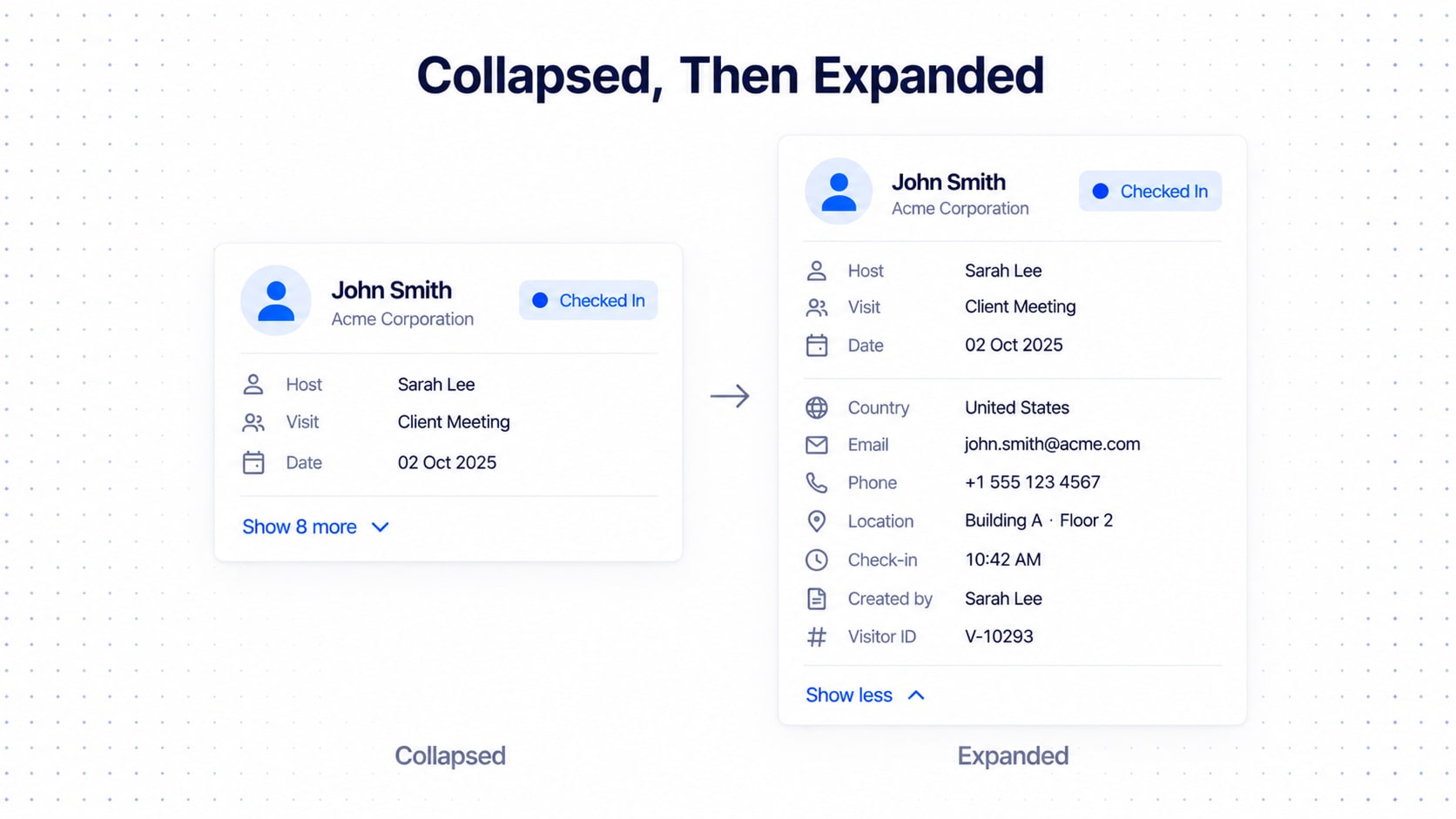
Collapsed
  ↓
Important information
  ↓
Expand
  ↓
Supporting / extended information
The rules:
Prefer one expansion level: Card → Details.
Keep the card header, identity and status visible when expanded.
Reveal extra fields in the same order as the schema.
Let users collapse again, and don't move them to another context unless necessary.
Use meaningful counts (
Show 8 more,View all details). A "Show more" with no number is a mystery box, and nobody trusts the mystery box.
Nested Data and Nested Tables
Enterprise data is relational:
Company
└── Employees

Visit
└── Visitors

Visitor
└── Visits

Device
└── Activity

Building
└── Rooms
The temptation is to stuff the child table inside the parent card. Russian dolls, except every doll has a scrollbar.
Nested field vs nested collection
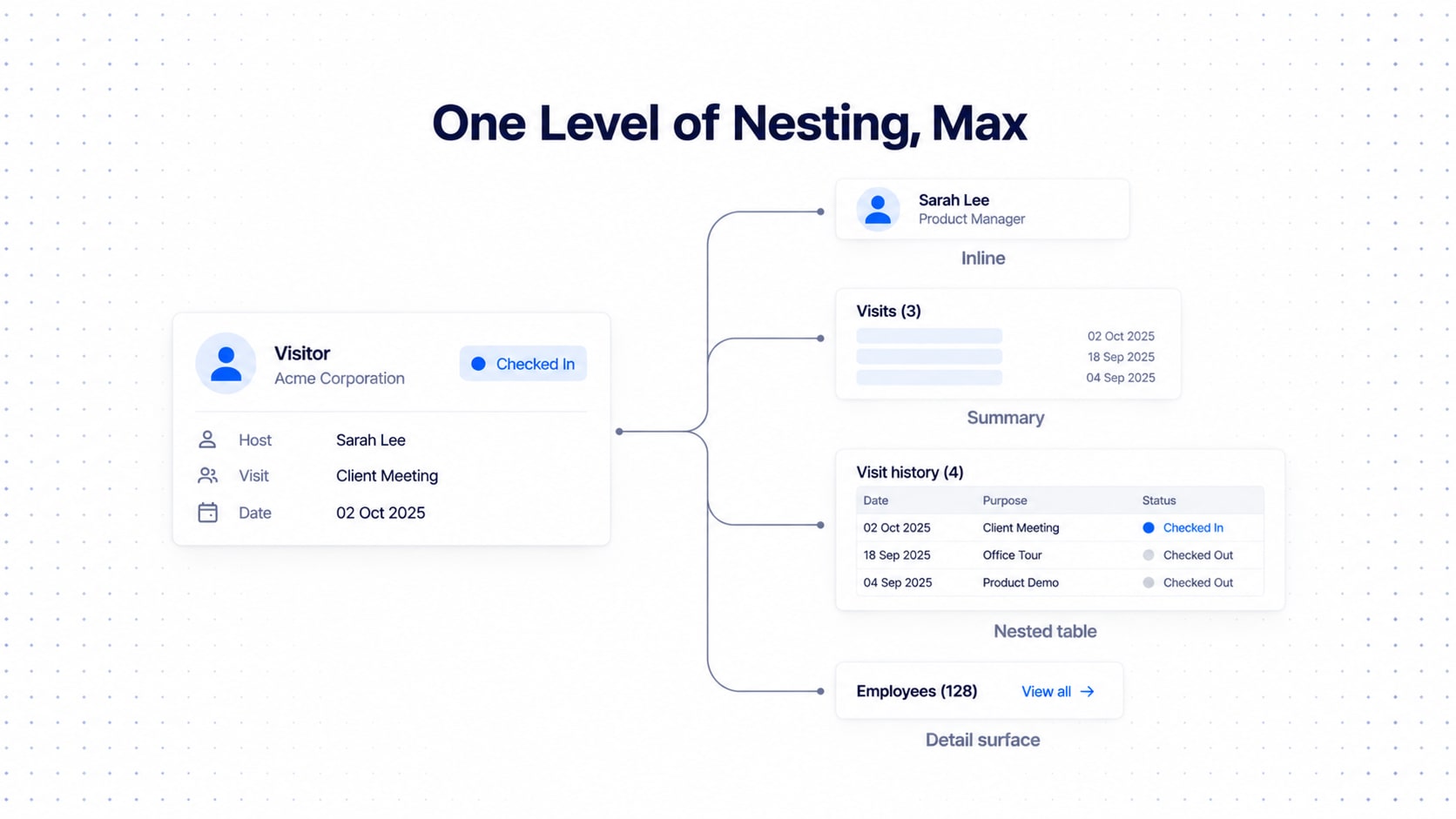
Nested field: a single related value.
Host
└── Person
Render it inline:
[Avatar] Sarah WilliamsNested collection: multiple related records. This needs a different pattern.
Visitor
└── Visits
    ├── Visit 1
    ├── Visit 2
    └── Visit 3
The summary pattern
Prefer this to rendering a full secondary table immediately:
Visitor Card
────────────────────────────
John Smith
Acme Corporation
Checked In

Visits (3)                  +
────────────────────────────
Latest visit
02 Oct · Client Meeting

View all visits →
When a nested table IS justified
Use one when the child records matter to the task, users need to compare them, there are enough child fields to justify columns, and the relationship is central to the workflow.
Expanded Visitor
────────────────────────────────

John Smith
Acme Corporation

Visit history (4)

Date       Host          Status
02 Oct     Sarah         Complete
18 Sep     David         Complete
02 Sep     Sarah         Cancelled
"The data happens to be relational" is not a reason. A relationship does not automatically justify a nested grid.
Classify the relationship
One-to-one
One-to-many
Many-to-one
Many-to-many
Visitor → Host is one-to-one / many-to-one. Visitor → Visits and Company → Employees are one-to-many. Then the rendering rule follows:
Single related entity      →  Inline
Small related collection   →  Summary
Large related collection   →  Nested table or detail surface
Complex related entity     →  Link to its detail view
The hard limit
Card
 → Expanded
   → Nested table
      → Expanded row
         → Nested table
That's not a UI. That's the movie Inception. After one nested level, move to a drawer, detail surface or page. A company with 128 employees links to an Employees collection; it doesn't unroll 128 people inside a card.
The Action System: Direct, Secondary and Destructive
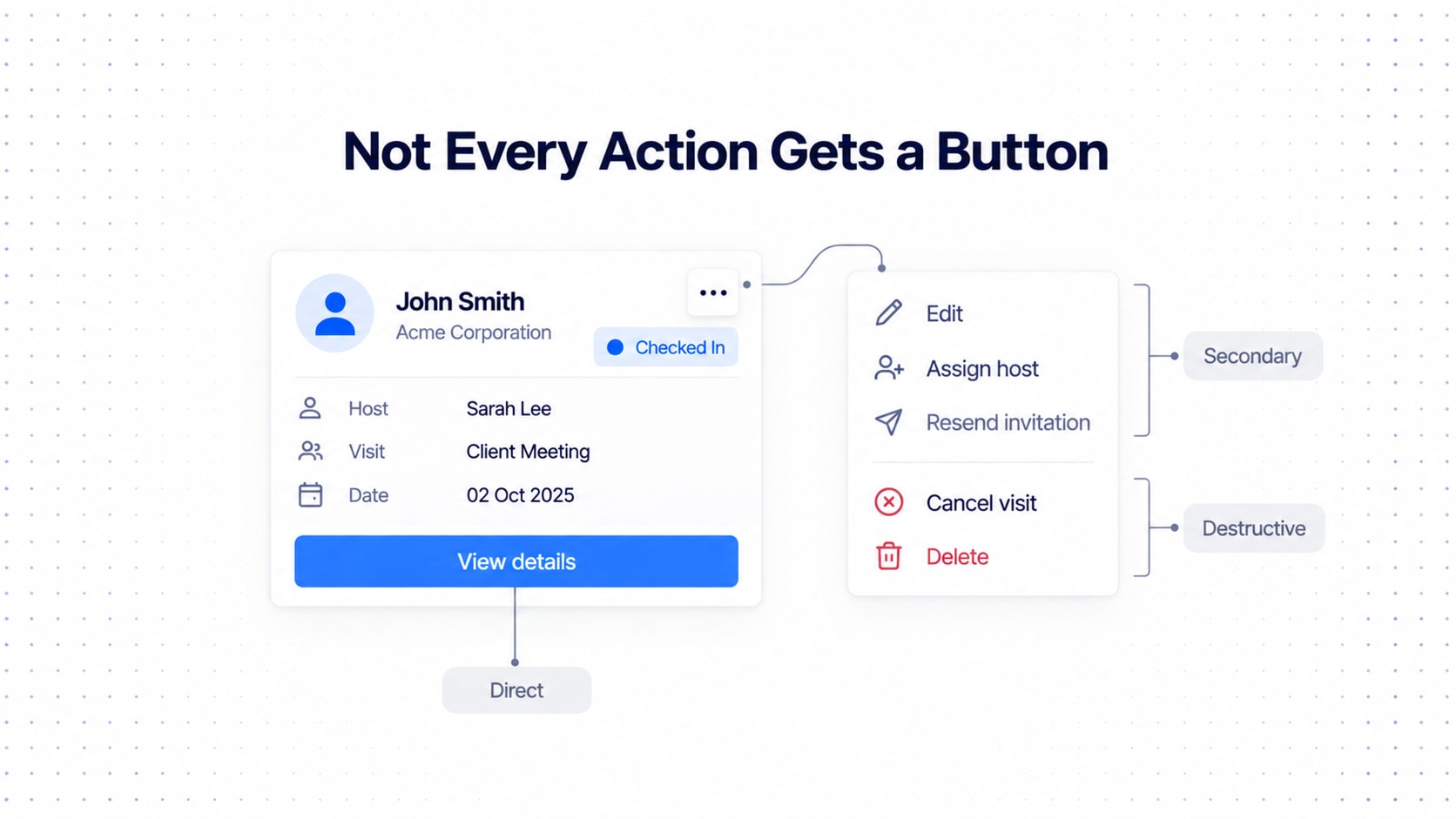
Level 1, Direct. Frequent, important, low-risk, immediately understandable, strongly tied to the record.
View
Check in
Approve
Open
Level 2, Secondary. Useful but not primary. A secondary button or overflow, depending on workflow.
Edit
Duplicate
Assign
Resend
Level 3, Destructive or rare. Overflow, plus confirmation when the consequence is significant.
Delete
Archive
Revoke
Remove
Ask five questions:
How often is this action used?
How important is it?
How risky is it?
How obvious is its meaning?
How much visual competition already exists?
Action | Frequency | Risk | Recommendation |
|---|---|---|---|
View | High | Low | Direct |
Check in | High | Low | Direct |
Edit | Medium | Low | Secondary / direct, depending on workflow |
Assign | Medium | Medium | Secondary |
Duplicate | Low | Low | Overflow |
Archive | Low | Medium | Overflow |
Delete | Low | High | Overflow + confirmation |
Placement
Sheet View: a dedicated trailing actions column. Use [⋯] when there are multiple secondary actions.
| Name | Company | Status | Date | Actions |Card View:
Header
   ├── Status
   └── Overflow

Body
   └── Primary information

Footer
   └── Primary action
Two rules: don't repeat an action in three places, and don't make the whole card clickable if it contains many controls. Make the title the primary link instead, or users will open records while aiming for the three-dot menu and then write angry emails.
Permissions, Record State and Available Actions
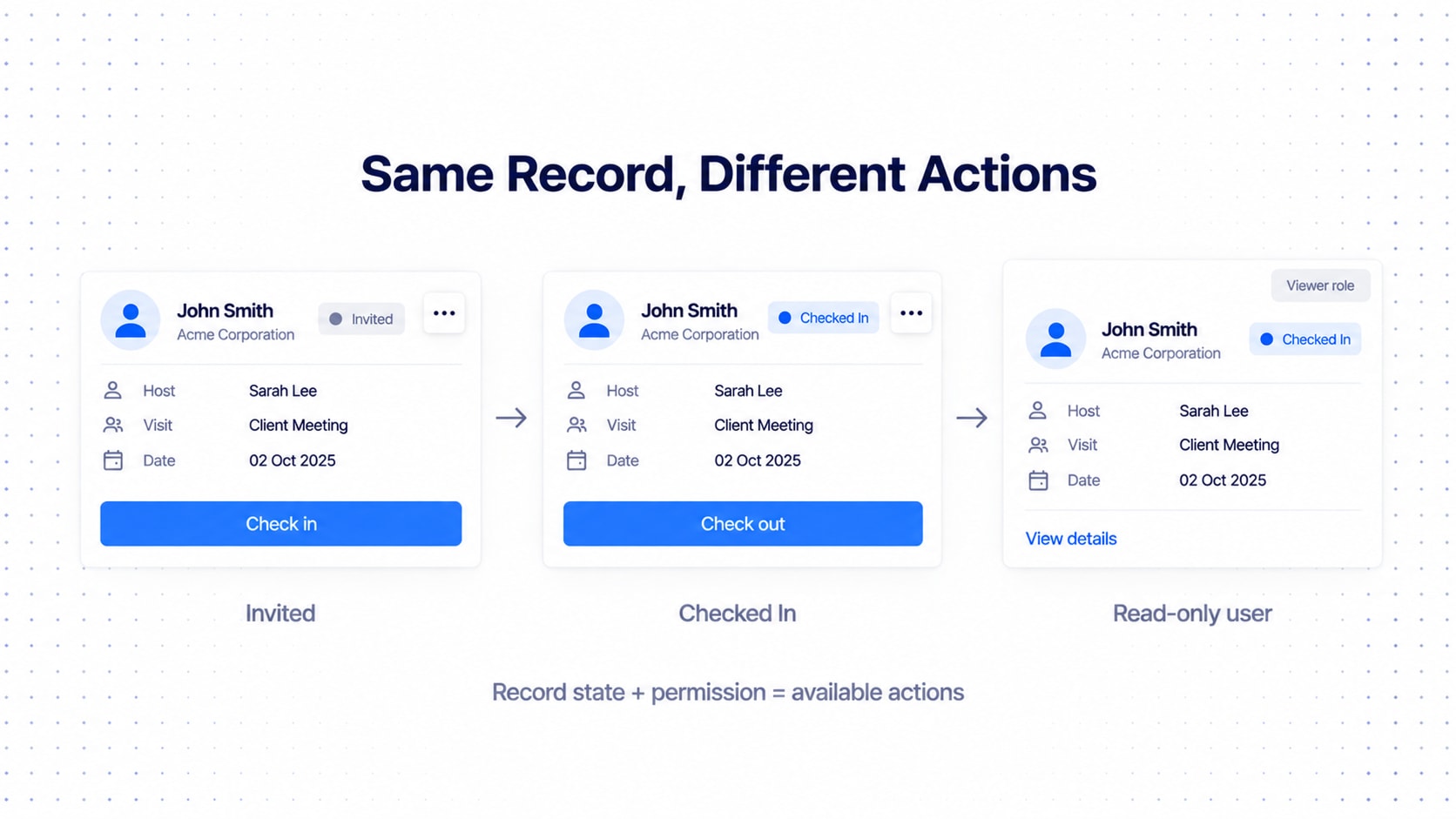
Here actions stop being a visual problem and become a logic problem. Availability depends on role, permission, record state, ownership and workflow state. If the status is Checked In, don't show Check in again; Check out becomes available. So the system evaluates this before rendering anything:
User permissions
+
Record state
+
Action availability
Document it once so the Sheet never shows an action the Card doesn't:
Record State | View | Edit | Check In | Check Out | Delete |
|---|---|---|---|---|---|
Invited | ✓ | ✓ | ✓ | — | ✓ |
Checked In | ✓ | ✓ | — | ✓ | depends |
Checked Out | ✓ | ✓ | — | — | depends |
Cancelled | ✓ | limited | — | — | ✓ |
Argue about it once in a meeting instead of forever in Slack.
Selection and Bulk Actions
Bulk actions aren't "single actions, but more." The toolbar should transform.
With nothing selected:
Search | Filter | Add visitorWith records selected:
12 selected
[Check in] [Assign] [Export] [⋯]
The user's intent changed, so the toolbar did too.
Only expose actions valid for all selected records.
With mixed states, disable invalid actions with an explanation, or apply to eligible records with explicit feedback, or offer a mixed-state workflow.
Never fail silently. Silent failure is how trust dies.
And selection belongs to the workspace, not the renderer:
Sheet
Select 5 records
   ↓
Switch to Card
   ↓
Same 5 records remain selected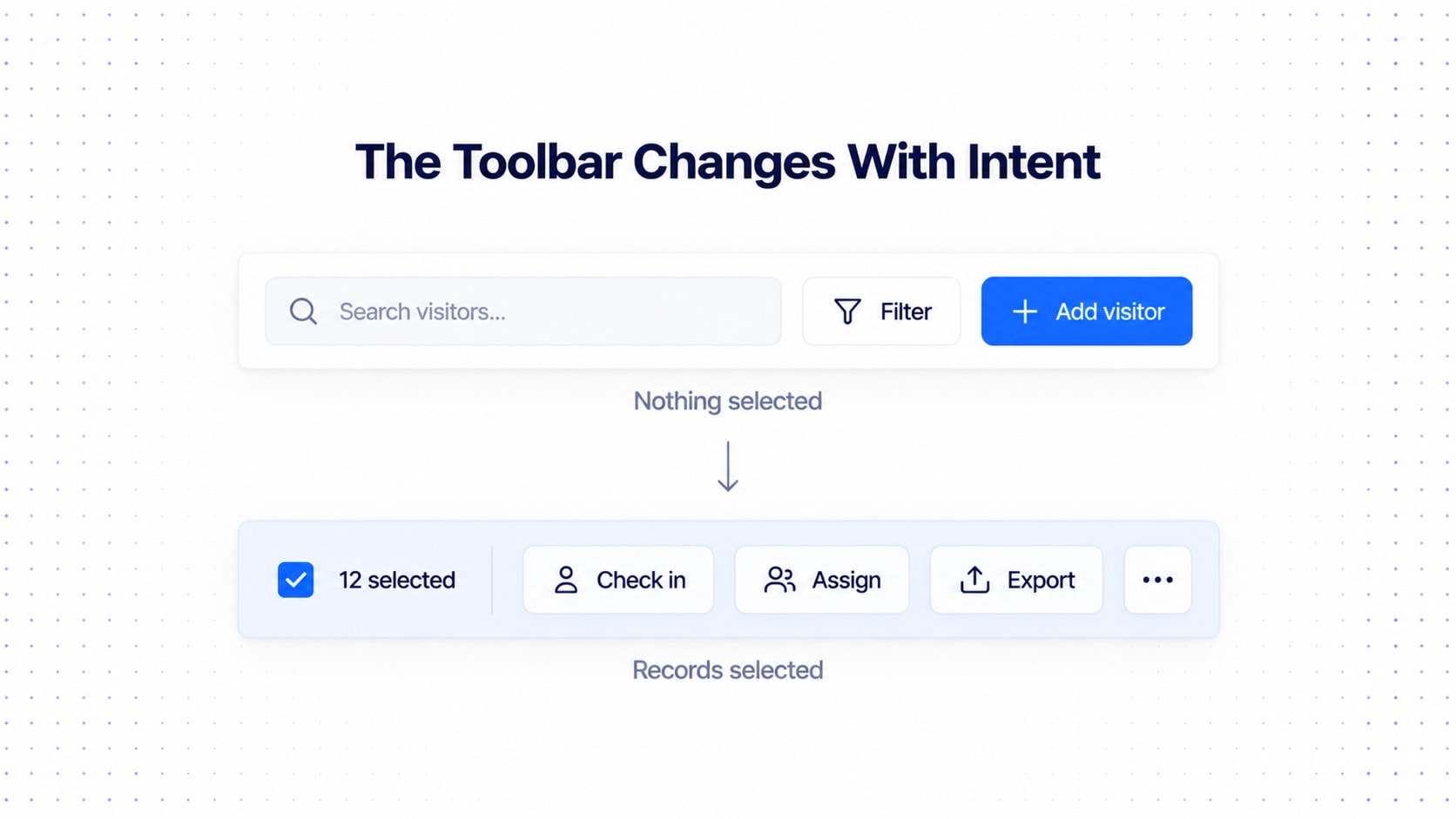
Sorting, Filtering and Search
All three belong to the shared dataset; both renderers consume the same sorted, filtered result.
Sorting is a small piece of state:
{
  "field": "checkIn",
  "direction": "descending"
}
Make the active sort obvious, and don't scatter arrows on every header: 14 little arrows make a table look like a cheap airport.
Filtering follows a hierarchy:
Search
Primary filters
Advanced filters
Active filter chips
Clear filters
Filter types: text, select, multi-select, date, date range, number range, status, person, company, location, boolean.
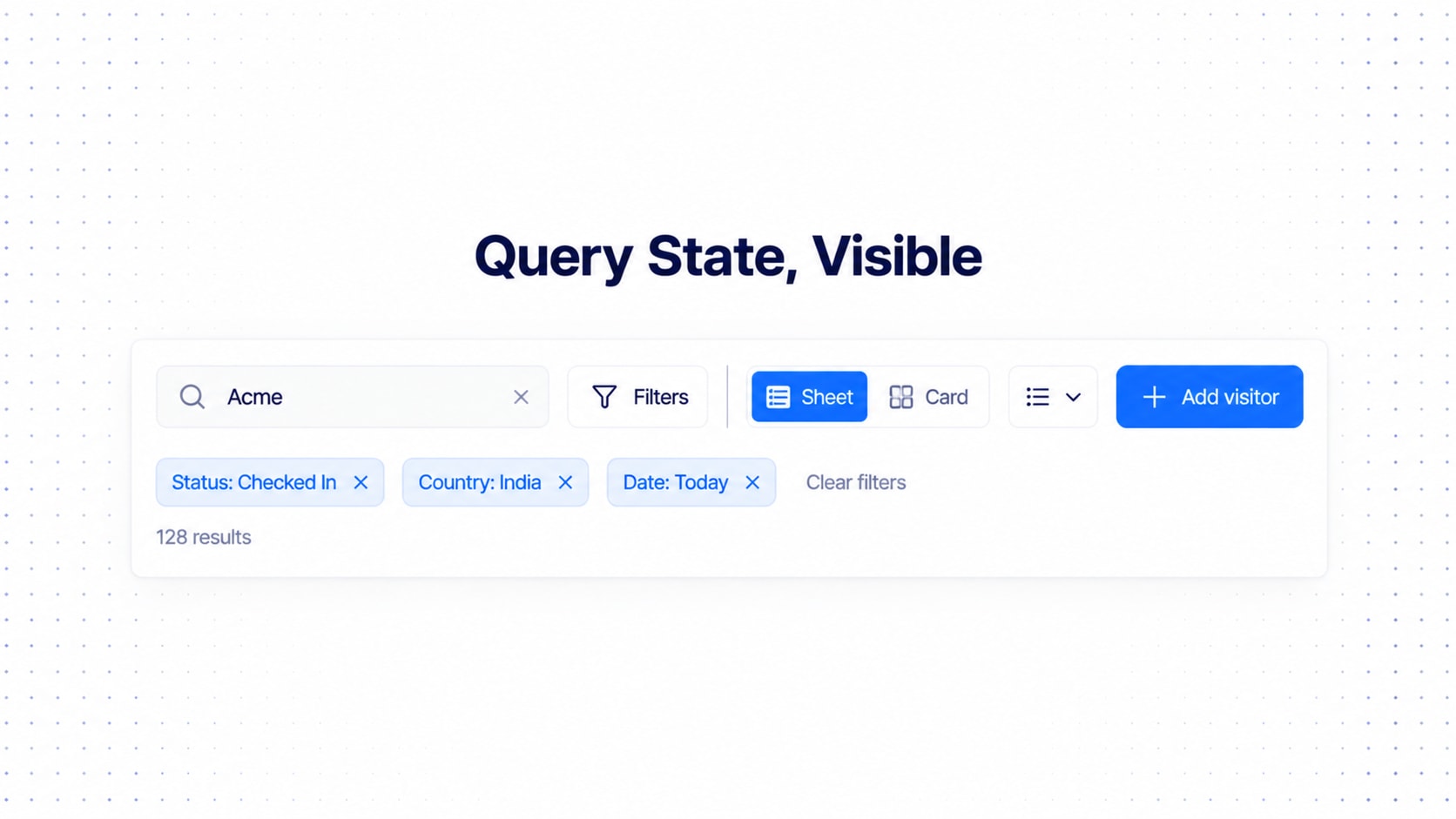
Always show what's active:
Status: Checked In
Country: India
Date: Today
A filtered table with no visible filters is a haunted house: users know something is hiding records, just not what.
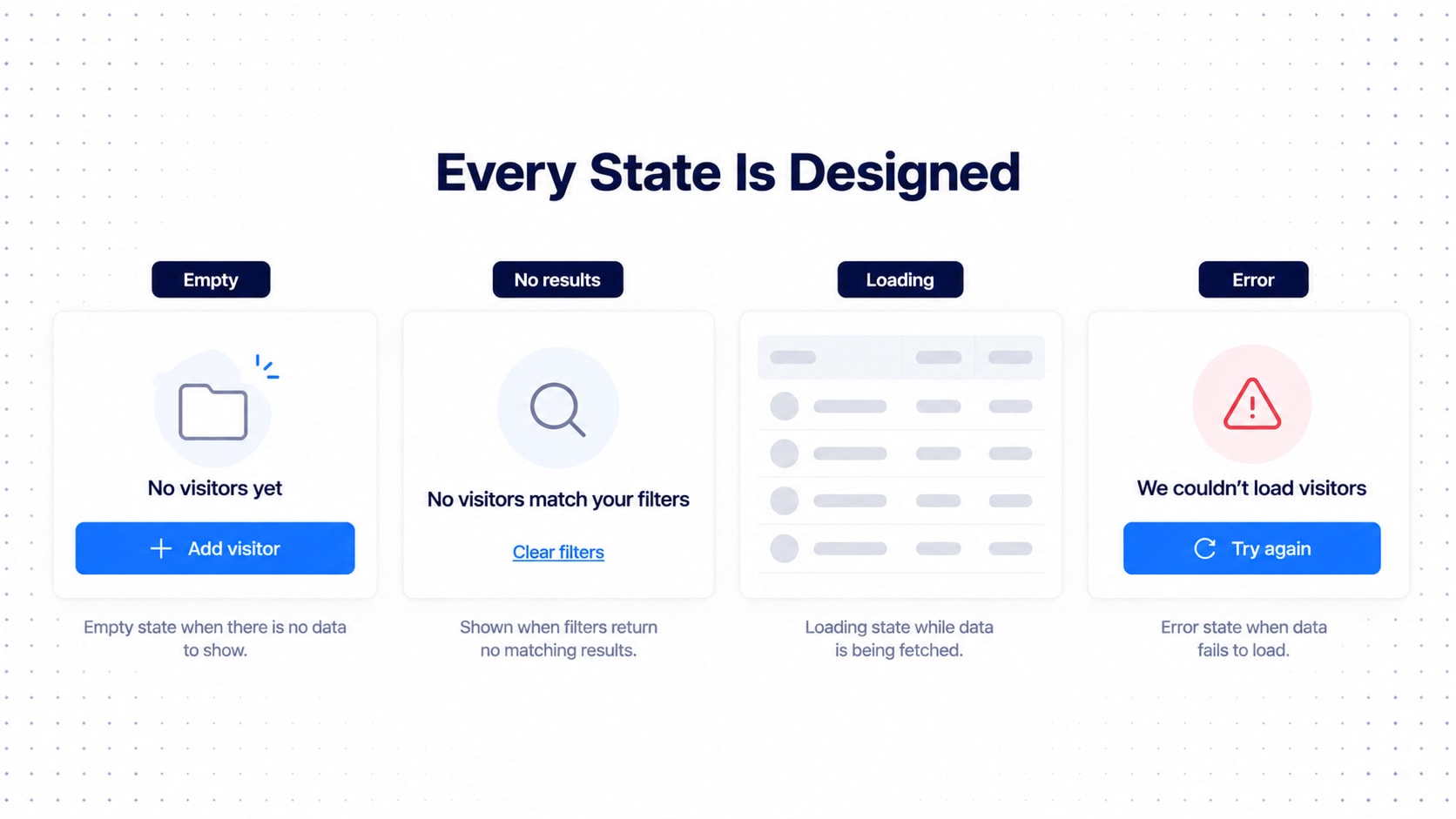
Empty, Loading, Error and No-Results States
Most teams design the happy path and improvise everything else at 5pm on release day.
Empty. No records exist.
No visitors yet
Add your first visitor to get started.
[Add visitor]
No results. Records exist, but the current filters return none. This is not the same as empty. Please do not tell a user with 40,000 records they have "no visitors yet."
No visitors match your filters.
[Clear filters]
Loading. Prefer skeletons that mirror the real layout.
Error. Say what happened and what to do.
We couldn't load visitors.
Try again or check your connection.

[Try again]
Add selected, expanded and disabled. Define all of them before the first real table.
Missing Data and Long Content
Two small things that wreck big products.
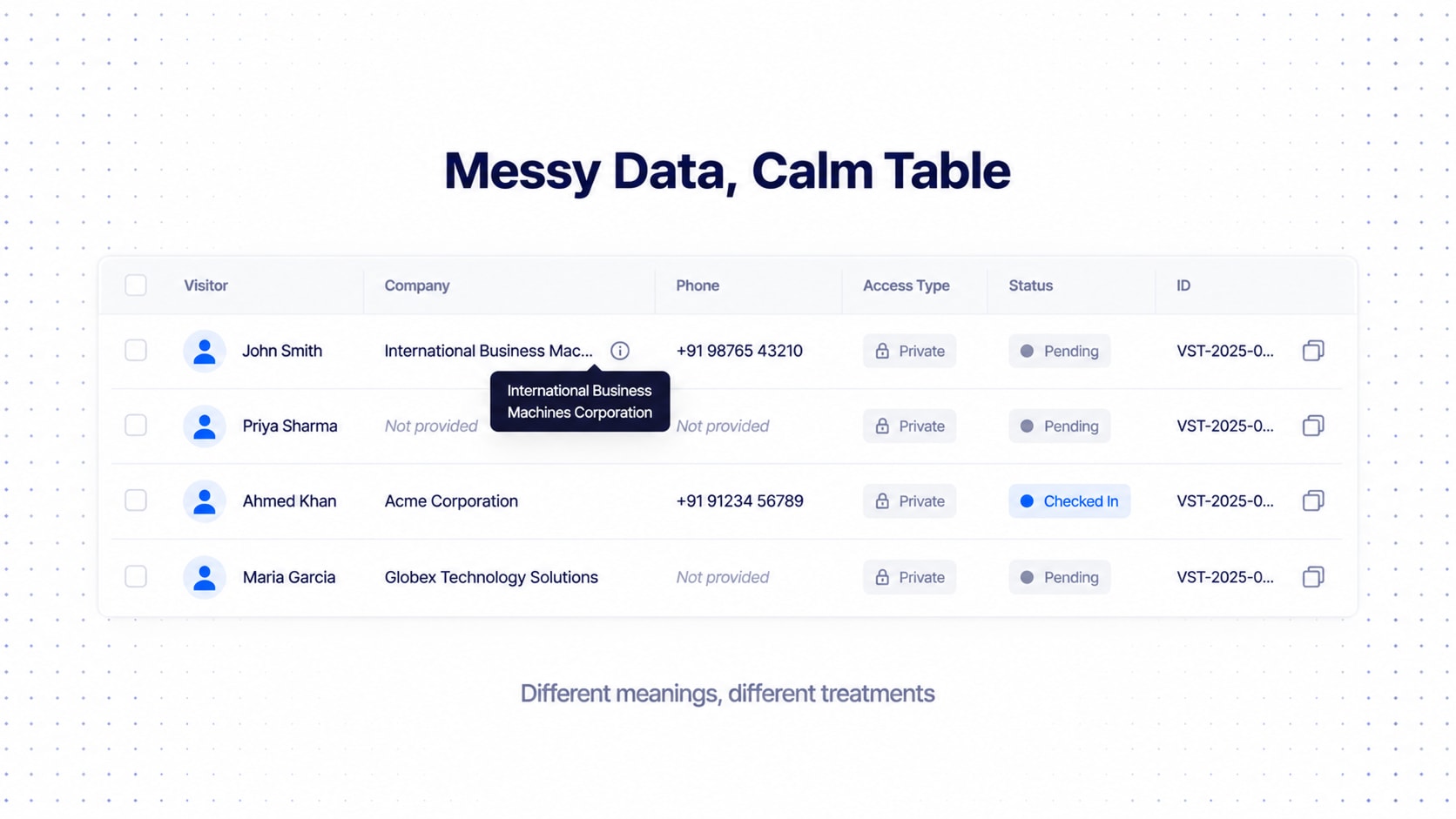
Missing data. Enterprise data is incomplete, and "missing" can mean very different things:
Unknown
Not provided
Not applicable
Unavailable
Private
Pending
Don't collapse them all into one dash if they differ. "Private" and "Unknown" aren't the same, and users deserve to know whether data is hiding from them or just doesn't exist. If they are equivalent, pick one system-wide representation (not four, we've seen four).
Long content. Every field needs a truncation rule:
Single line
Two lines
Ellipsis
Tooltip
Expandable
Wrap
Names: one or two lines. IDs: truncated but copyable. Notes: expandable. URLs: a readable label, not the raw URL. Long company names: ellipsis plus an accessible full value. Never let one field destroy the layout.
Density: Compact, Default and Comfortable
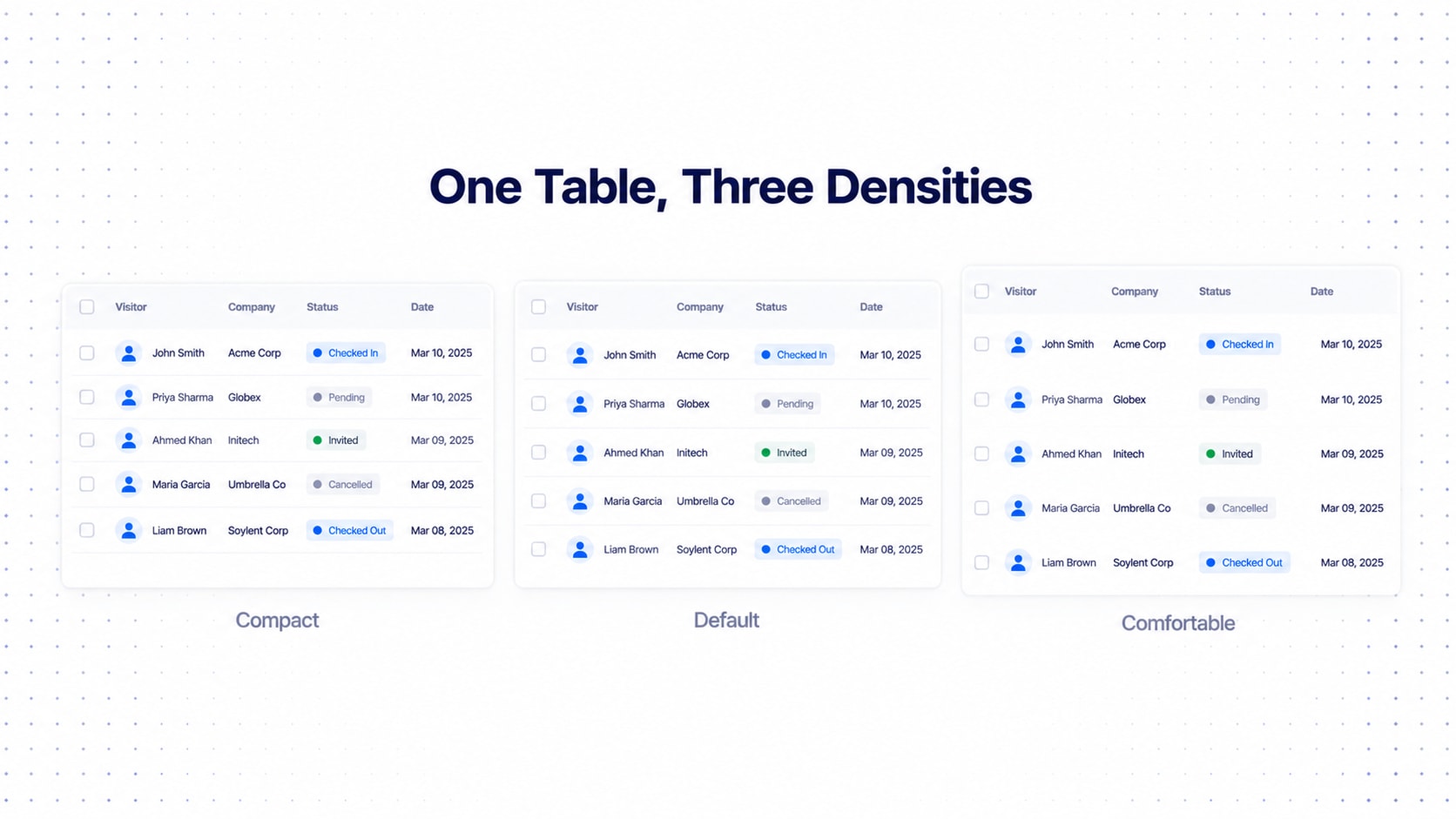
Density is a system-level setting, not a per-component hobby:
Compact
Default
Comfortable
(Some systems add Ultra Compact for power users.) It affects row height, card padding, field gaps, cell padding, control sizes and vertical rhythm. The mistake is giving every component its own padding. If your table's "compact" is 36px and your card's "compact" is 11px of mystery padding, you don't have density, you have vibes.
Tie it to tokens (table.row.height, card.padding, record.summary.gap) so one setting reshapes everything. Power users will beg for compact; first-timers will love comfortable. Give both.
Responsive Data Tables (Do Not Just Shrink the Table)
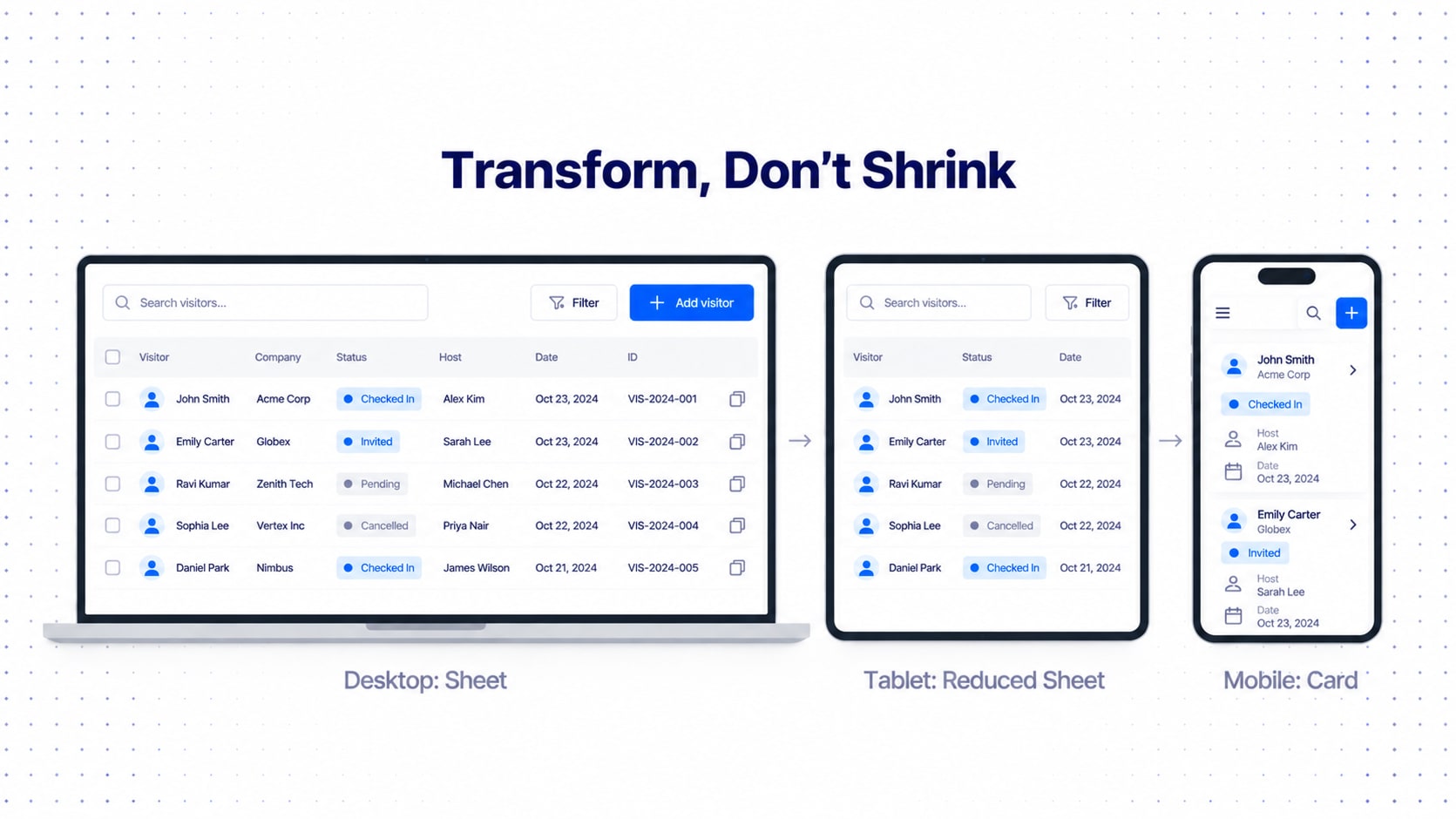
The laziest responsive strategy in history: shrink the desktop table until it fits. Define transformations instead:
Desktop
→ Sheet + Card available

Tablet
→ Sheet with fewer visible columns / Card

Mobile
→ Card-first
And priority earns its keep again:
P0 → always
P1 → usually
P2 → conditional
P3 → expansion
The model that decides what a card shows also decides which columns survive a small screen.
Data Table Accessibility
Accessibility isn't a QA item you remember at 6pm the night before launch. It's architecture.
Sheet View needs semantic table structure, keyboard navigation, visible focus, accessible sort and selection, and accessible status communication.
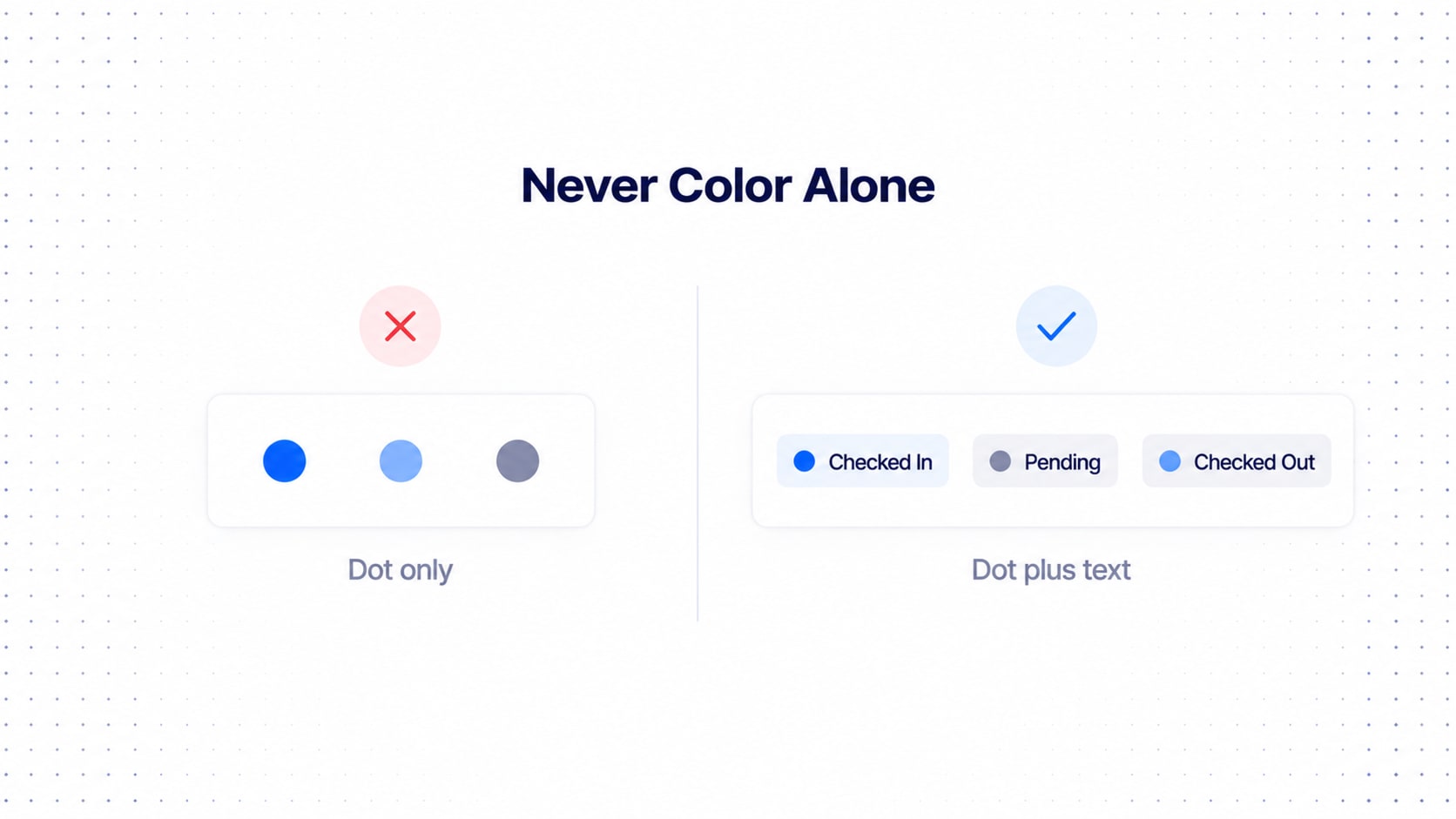
Card View needs logical reading order, keyboard-accessible expansion, accessible action labels, focus management and no color-only information.
Bad:
Green = checked inBetter:
● Checked InColor should reinforce text, never carry the meaning alone.
Figma Architecture (Mirror the Code)
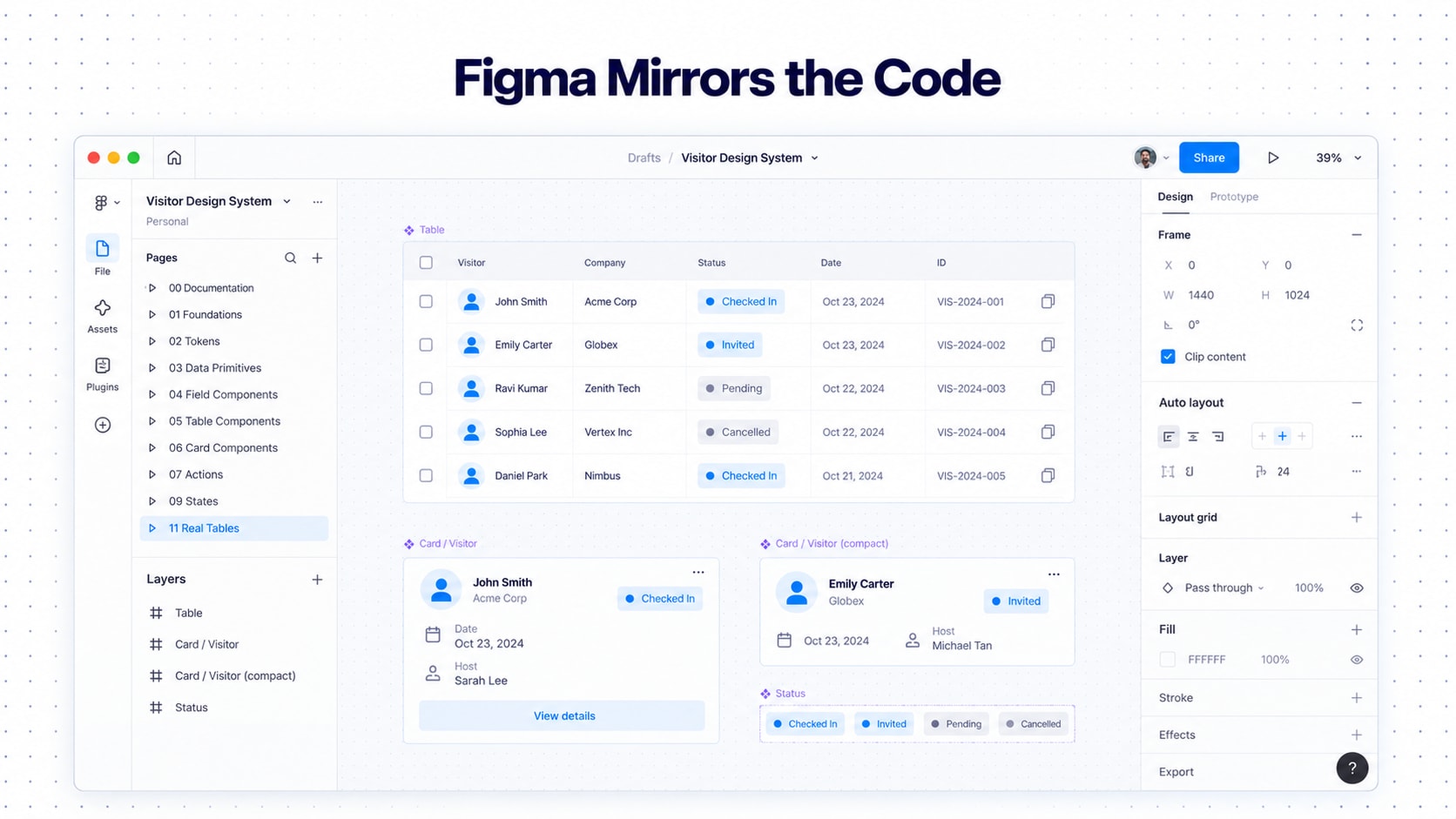
Structure Figma so it mirrors the development architecture. If design and code are organized differently, someone translates between them forever, usually you at 11pm. (The 02 — Tokens page is the same architecture from our design tokens guide, consumed by data components.)
00 — Documentation
01 — Foundations
02 — Tokens
03 — Data Primitives
04 — Field Components
05 — Table Components
06 — Card Components
07 — Actions
08 — View Controls
09 — States
10 — Patterns
11 — Real Tables
12 — Playground
Component families:
Data / Text
Data / Number
Data / Date
Data / DateTime
Data / Person
Data / Company
Data / Country
Data / Status
Data / Tag
Data / Link
Data / ActionsTable / Container
Table / Toolbar
Table / Header
Table / HeaderCell
Table / Row
Table / Cell
Table / Expansion
Table / FooterCard / Record
Card / Header
Card / Identity
Card / Summary
Card / Field
Card / Details
Card / Actions
Card / ExpansionProperties on a Record Card:
State:    Default / Hover / Focused / Selected / Expanded / Disabled / Loading
Density:  Compact / Default / Comfortable
Status:   None / Success / Warning / Error / Info / Neutral
Show Avatar:  True / False
Show Status:  True / False
Expanded:     True / False
And a warning: don't create a property for every possible field. Compose fields through nested components, or you get a component with 47 toggles nobody dares touch, like a rental apartment's fuse box. Page 11, "Real Tables," holds instances and configurations, never bespoke component families.
Development Architecture
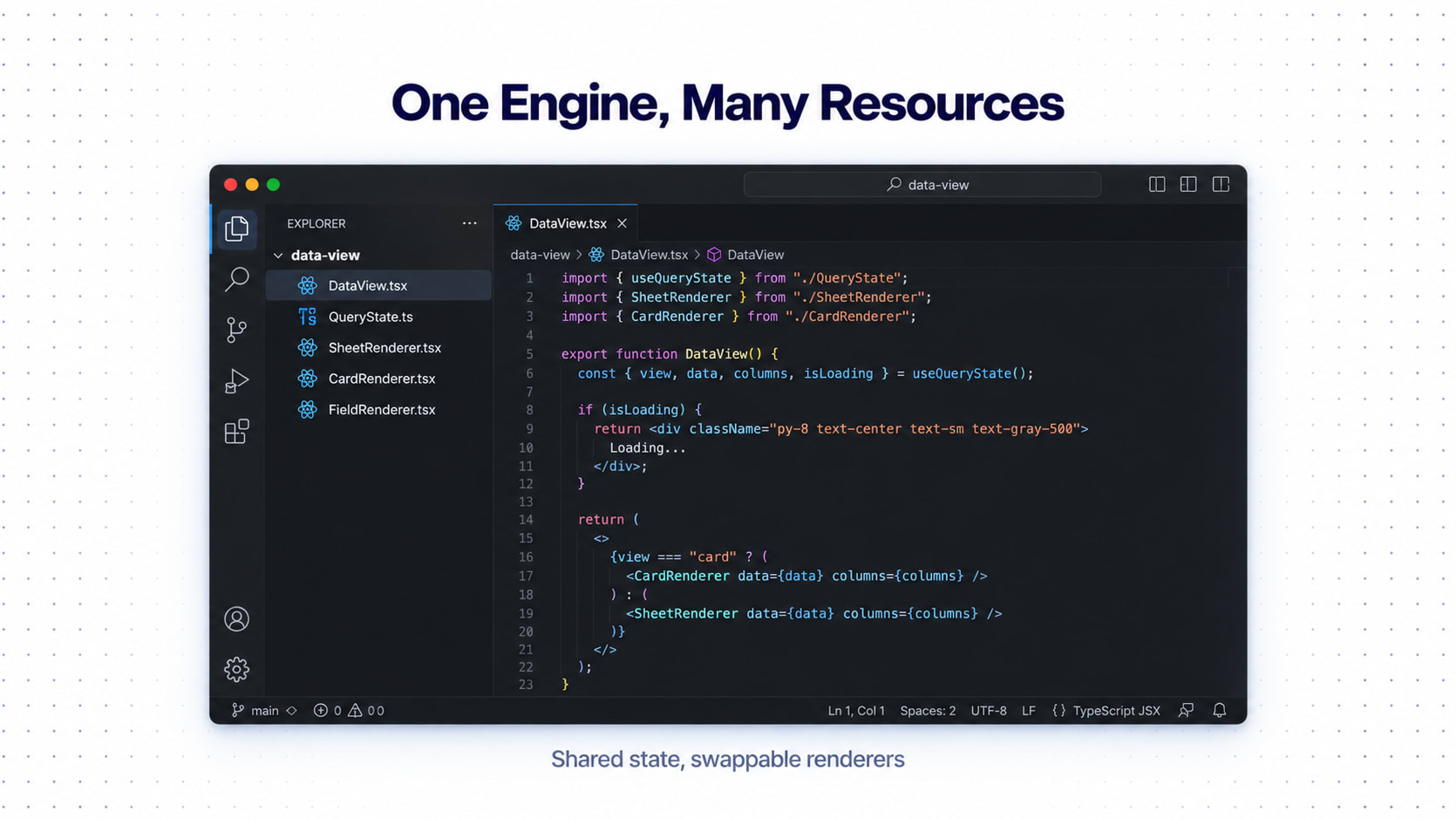
The engineering model is the same idea in code:
DataView
│
├── DataSource
│
├── QueryState
│   ├── Search
│   ├── Filters
│   ├── Sort
│   ├── Pagination
│   └── Selection
│
└── Renderer
    ├── SheetRenderer
    └── CardRenderer
And field rendering:
FieldDefinition
      ↓
FieldType
      ↓
FieldRenderer
That's how one enterprise data system supports many resources without a custom implementation for each.
Configuration Schema and the Data Display Contract
This is why all of it pays off: a real table becomes a configuration.
{
  "resource": "visitors",
  "view": {
    "default": "sheet",
    "available": ["sheet", "card"]
  },
  "fields": [
    {
      "key": "name",
      "type": "person",
      "priority": "P0",
      "sortable": true,
      "filterable": true,
      "searchable": true
    },
    {
      "key": "company",
      "type": "company",
      "priority": "P1"
    },
    {
      "key": "status",
      "type": "status",
      "priority": "P1",
      "filterable": true
    },
    {
      "key": "country",
      "type": "country",
      "priority": "P2"
    }
  ]
}
The same schema drives both views. Add a field to the config and it appears in the Sheet, the Card and the expanded details with the right priority logic. Nobody opens Figma. Nobody files "Please add one more column :)".
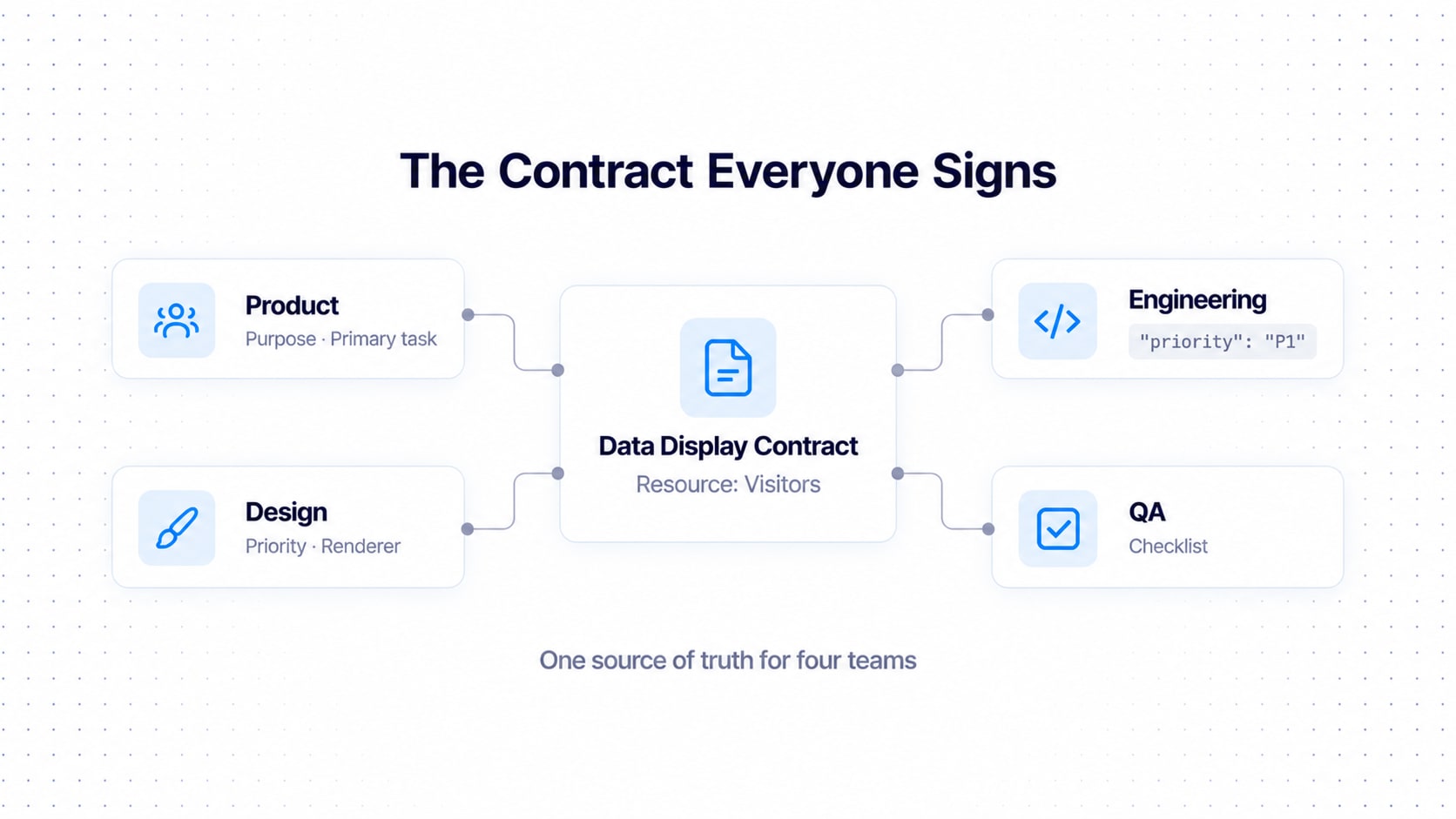
The contract
Every real table also gets a Data Display Contract bridging Product, Design, Development and QA, basically the table's employment agreement.
Table / resource level:
Purpose
Primary user
Primary task
Record type
Field count
Primary identifier
Primary status
Primary actions
Field level:
Property | Definition |
|---|---|
Field | Name of the field |
Type | Rendering type |
Priority | P0 / P1 / P2 / P3 |
Renderer | Visual treatment |
Interactive | Can it be interacted with? |
Sortable | Supports sorting |
Filterable | Supports filtering |
Searchable | Supports search |
Sheet visible | Visible in Sheet |
Card collapsed | Visible in collapsed card |
Card expanded | Visible in expanded card |
It stops a table from becoming an undocumented pile of visual decisions that only one person remembers, usually the one who just resigned.
Performance: When 20 Records Become 20,000
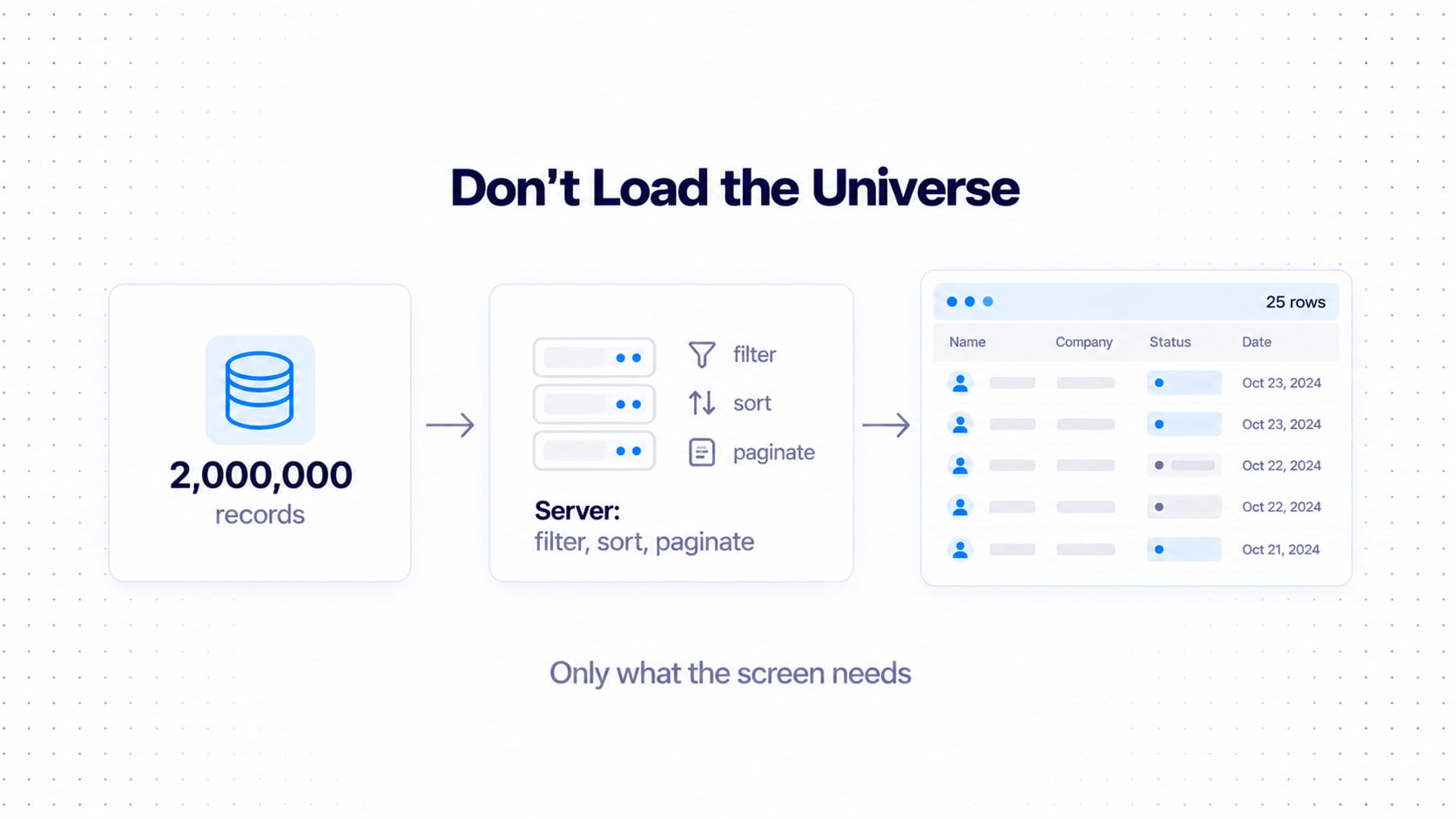
Your table will be tested with 20 records in the demo and 2 million in production. Real life enjoys irony. Assume it from day one:
Server-side filtering
Server-side sorting
Pagination
Virtualization
Lazy loading
Debounced search
Incremental loading
Golden rule: don't assume the whole dataset lives in the browser. If your plan is "load everything and filter it in JavaScript," your plan has an expiry date. Cards cost more to render than rows, so don't render off-screen records nobody can see.
Governance: How the System Evolves
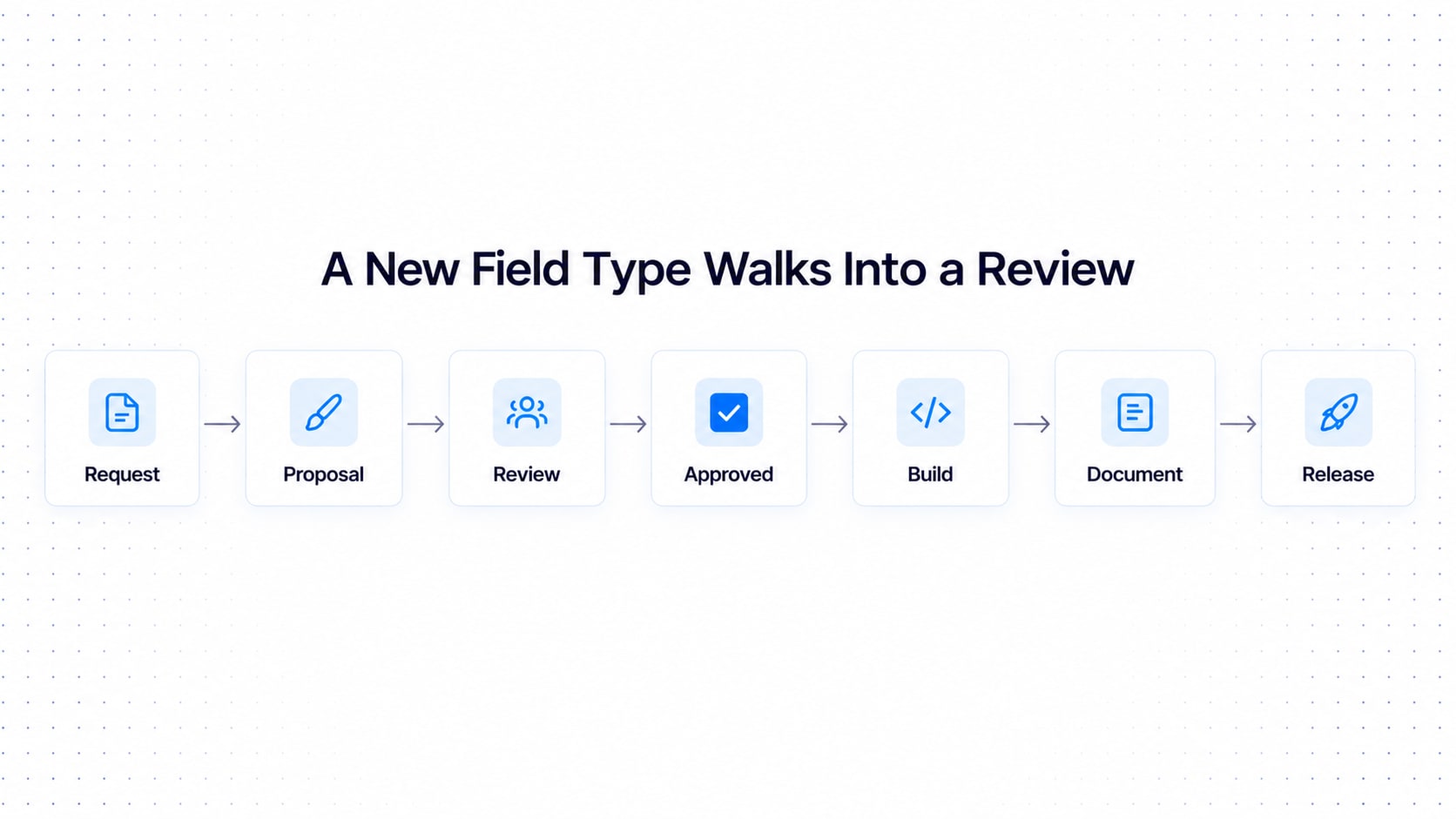
A data display system dies the way a token system does: everyone adds "just one more" custom thing. A new field type here, a seventh status treatment there, a "quick card" for one screen.
Define who can add field types or cells, who approves new renderers, how priority rules change, how breaking changes, deprecation and migration work, and where each table's contract lives.
Request
   ↓
Proposal
   ↓
Review
   ↓
Approved
   ↓
Implementation
   ↓
Documentation
   ↓
Release
Yes, it looks like a corporate expense report. Chaos hates paperwork.
Real-World Example: Visitor, Device and Company Records
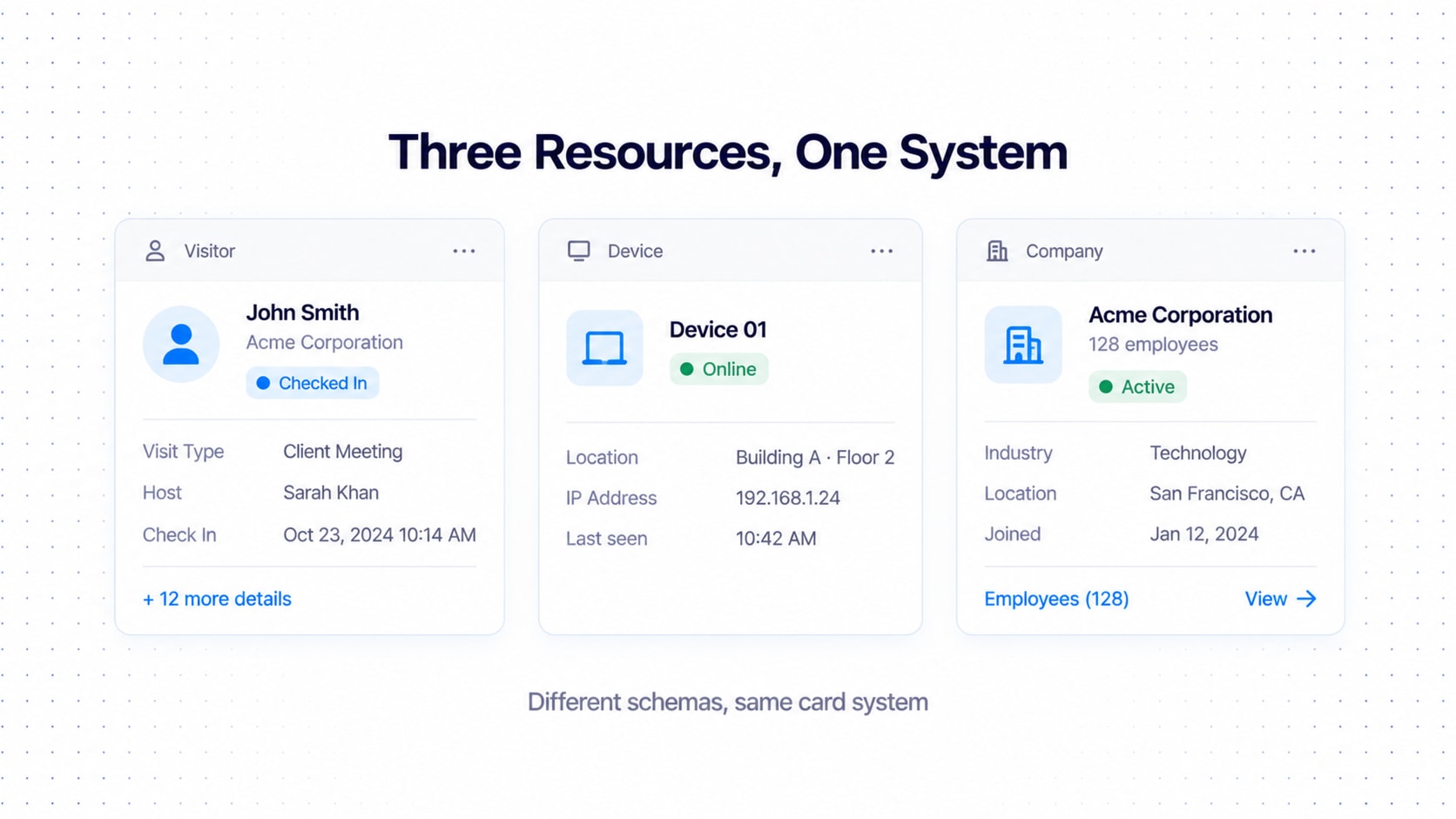
Visitor management
One visitor record can hold 19 fields: name, company, country, email, phone, host, visit type, purpose, location, date, check-in, check-out, status, created, created by, updated, visitor ID, approval, notes. Sheet View optimizes for scanning (Name | Company | Host | Date | Status | ...).
Card View, collapsed:
┌──────────────────────────────────────────────┐
│ [Avatar] John Smith             ● Checked In │
│          Acme Corporation                    │
│                                              │
│ Host       Sarah Williams                    │
│ Visit      Client Meeting                    │
│ Date       02 Oct · 10:30 AM                 │
│                                              │
│ + 12 more details                    ↓       │
└──────────────────────────────────────────────┘
Card View, expanded:
┌──────────────────────────────────────────────┐
│ Identity and summary remain visible          │
│                                              │
│ Country       🇮🇳 India                      │
│ Email         john@acme.com                  │
│ Phone         +91 XXXXX XXXXX                │
│ Purpose       Client Meeting                 │
│ Location      Building A                     │
│ Check-in      09:42 AM                       │
│ Check-out     —                              │
│ Created by    Sarah Williams                 │
│ Visitor ID    VIS-10482                      │
│ Approval      Approved                       │
│ Notes         ...                            │
│                                              │
│                              Show less ↑     │
└──────────────────────────────────────────────┘
The four-field dataset
A Device table with Device, Location, Status and Last Seen doesn't need the visitor density. No expansion, nothing hidden:
┌──────────────────────────────────────────────┐
│ Device 01                         ● Online   │
│ Building A · Floor 2                         │
│ Last seen 10:42 AM                           │
└──────────────────────────────────────────────┘
Company with nested employees
┌──────────────────────────────────────────────┐
│ Acme Corporation                             │
│ 128 employees                    ● Active    │
│                                              │
│ Primary contact: Sarah Williams              │
│ Location: London                             │
│                                              │
│ Employees (128)                     View →   │
└──────────────────────────────────────────────┘
Clicking Employees should usually open a dedicated collection view, not unroll 128 people inside the card.
Record actions for a visitor
Primary:
View.Contextual:
Check in.Secondary:
Edit,Assign host,Resend invite.Rare or destructive:
Cancel visit,Delete.
[View details] [⋯]Overflow: Edit, Assign host, Resend invitation, Cancel visit, Delete. The exact actions depend on permissions and record state.
Anti-Patterns: The Hall of Shame
Every table gets a custom card.
20 tables
→ 20 cards
→ 20 interaction models
Instead:
20 schemas
→ 1 Record Card System
→ 20 configurations
Forcing exactly four fields. Fails at two fields and at twenty-five.
Every field in the collapsed card. Congratulations, you made a form that scrolls.
Card View as a Detail Page. Kills scanning and makes collections heavy.
Copying a reference literally. Zoho (or anyone) is a fine interaction reference; your architecture should stay specific to your system.
Icons everywhere. Richness without meaning is noise with a stroke width.
Separate query logic per view. Search, filter, sort and selection must be shared.
Infinite nested expansion. One level, then a nested table, drawer or detail surface.
Enterprise Data Table QA Checklists
Design QA
Data
Are all fields classified?
Are field types correct?
Are priorities defined?
Are missing states defined?
Sheet
Can users compare records?
Are columns aligned?
Are actions predictable?
Is density appropriate?
Card
Is identity immediately recognizable?
Are primary fields visible?
Is expansion meaningful?
Is rich formatting semantic?
Actions
Are primary actions obvious?
Are rare actions hidden?
Are destructive actions protected?
Are permissions respected?
Nested data
Are relationships understandable?
Is nested data necessary?
Is nesting limited?
States
Loading? Empty? No results? Error? Disabled? Selected? Expanded?
Accessibility
Keyboard? Focus? Screen reader? Color-independent status?
Performance
Pagination? Virtualization? Server-side operations? Lazy rendering?
Engineering QA
□ Same schema supports Sheet + Card
□ Search state is shared
□ Filter state is shared
□ Sort state is shared
□ Selection is shared
□ Pagination is shared
□ Field renderers are reusable
□ Permissions affect actions
□ Record state affects actions
□ Nested data has explicit rules
□ Loading states exist
□ Error states exist
□ Empty states exist
□ Accessibility is implemented
□ Long values are handled
□ Missing values are handled
□ Large datasets are supported
□ View switching preserves context
Tick most of these and you're no longer maintaining a pile of tables. You're running data-display infrastructure.
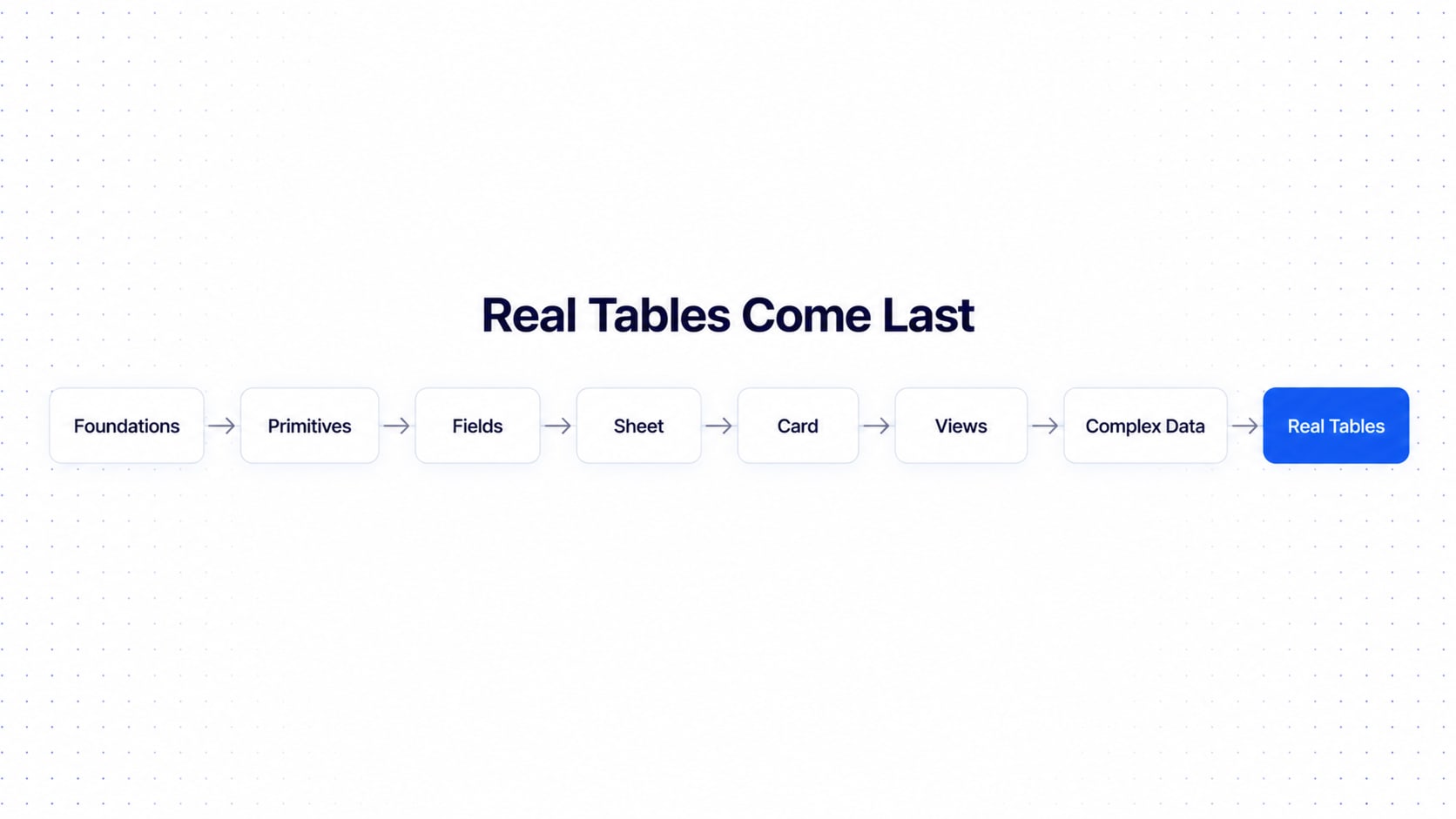
Recommended Build Sequence
Don't start by designing every real table, or you'll end up with nineteen tables and zero system.
Phase 1 — Foundations
Colors, Typography, Spacing, Radius, Borders, Icons, Elevation

Phase 2 — Data primitives
Text, Number, Date, Person, Company, Country, Status, Tag, Link, Actions

Phase 3 — Field system
Field type, Field priority, Field renderer, Field states

Phase 4 — Sheet system
Table, Header, Cell, Row, Selection, Expansion, Toolbar, Filters, Pagination

Phase 5 — Card system
Record Card, Identity, Summary, Metadata, Details, Actions, Expansion

Phase 6 — View system
Sheet, Card, View switcher, Density, Configuration

Phase 7 — Complex data
Nested records, Nested collections, Related entities, Attachments, Audit information

Phase 8 — Real tables
Visitors, Visits, Employees, Hosts, Companies, Devices...
Only in Phase 8 do you build the "real" tables, and by then they're configurations, not fresh inventions.
Where This Fits in the Series
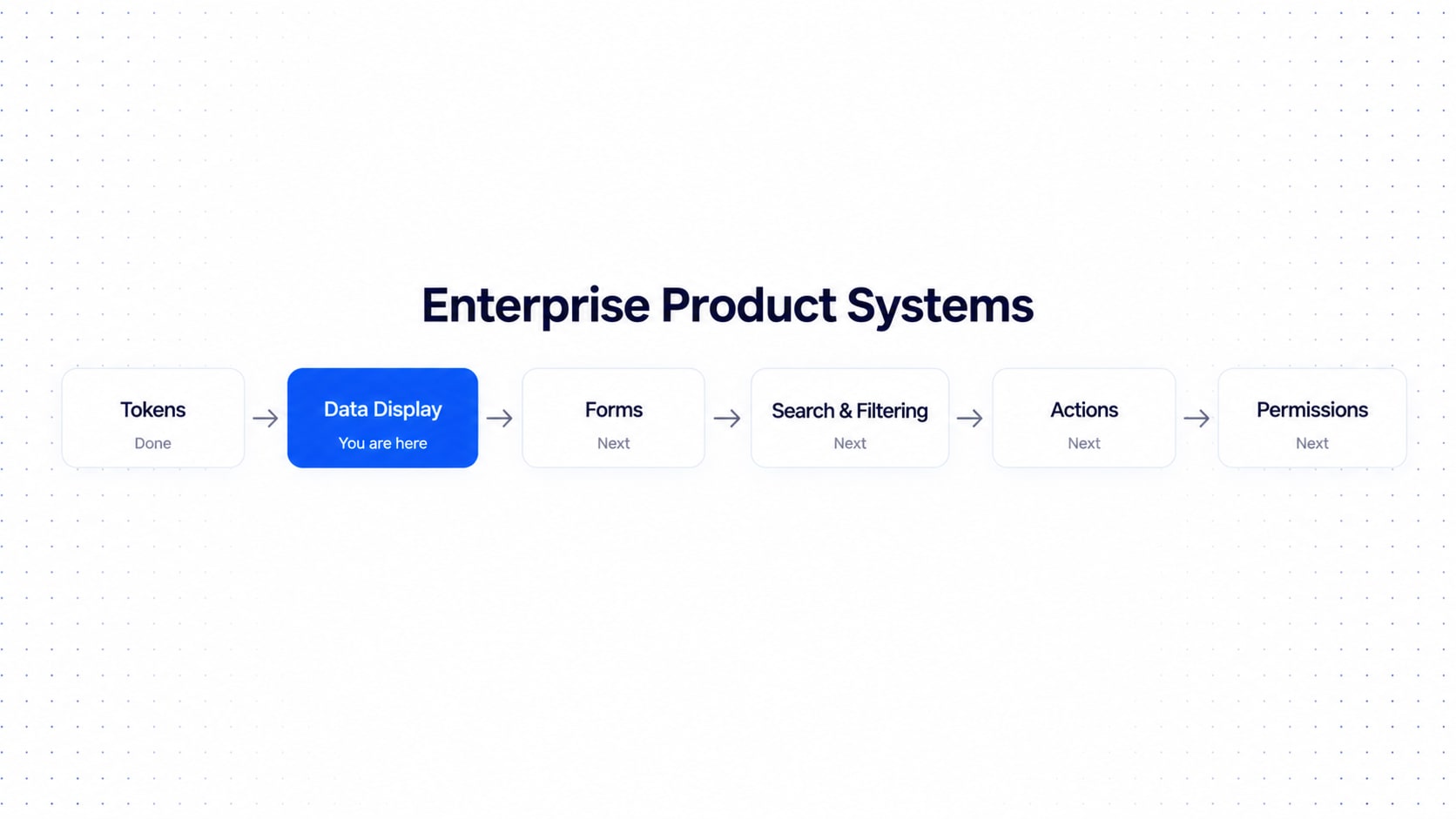
This is Tutorial 02 in the Enterprise Product Systems series. Tutorial 01, How to Build an Enterprise-Grade Design Token System, came first because everything here runs on tokens. And this one quietly plants the seeds for what comes next:
Tokens (done)
   ↓
Data Display System (you are here)
   ↓
Forms → Search & Filtering → Actions → Permissions → Workflows → Record Detail → ...
Everything we touched briefly here (actions, permissions, bulk operations, states, density, nested records, audit) gets its own full tutorial.
Think of this ebook as the foundation the rest of the enterprise product is going to stand on.
The Mental Model to Remember
If you forget everything else, remember this flow:
ENTERPRISE DATA
                              │
                              ▼
                         DATA MODEL
                              │
                              ▼
                            SCHEMA
                              │
              ┌───────────────┼───────────────┐
              ▼               ▼               ▼
          FIELD TYPE       PRIORITY        BEHAVIOR
              │               │               │
              └───────────────┼───────────────┘
                              ▼
                       VIEW CONFIGURATION
                              │
                 ┌────────────┴────────────┐
                 ▼                         ▼
           SHEET RENDERER             CARD RENDERER
                 │                         │
           Comparison                 Recognition
           Dense                      Rich
           Structured                 Hierarchical
                 │                         │
                 └────────────┬────────────┘
                              ▼
                         USER ACTIONS
And the one-liner philosophy, for the office fridge:
A table optimizes for comparison. A card optimizes for recognition. Expansion optimizes for progressive disclosure. A detail surface optimizes for investigation. Tokens optimize for consistency. Configuration optimizes for scale. A shared data model makes all of them work together.
FAQ: Enterprise Data Table and Data Display System Design
What is an enterprise data display system? A reusable set of rules, components and configuration that renders any enterprise record as a table, card, expanded record or detail page from one shared data model.
What's the difference between Sheet View and Card View? Sheet View optimizes for comparing many records; Card View optimizes for recognizing one. Both render the same schema and share the same query state.
How many fields should a card show? There's no fixed number. Show P0 always, add the best P1 and P2 fields that fit, move the rest into Details, and skip the expand control if nothing is hidden.
When should you use a nested table? When users must compare child records and the relationship is central to the task. Otherwise use inline values, summaries or a link to a detail surface, and never nest past one level.
How do you make a data table responsive? Don't shrink it. Use field priority to drop to fewer columns on tablet and a card-first layout on mobile.
How do you handle 100,000+ records? Server-side filtering, sorting and pagination, plus virtualization and lazy rendering. Never assume the dataset lives in the browser.
Final Thought
A table component answers "how do we show rows?"
A data display system answers a much bigger question: how do we turn complex data into understandable interfaces, across every resource, screen size and user, without rebuilding it all each time?
The strongest enterprise data systems aren't collections of beautiful components. They're rules. Rules that let a designer or developer take any enterprise record and answer:
What is it?
What matters?
What should be visible?
What should be hidden?
How should it render?
What can the user do?
What happens when it expands?
What happens when data is missing?
What happens when there are 100,000 records?
Answer those consistently and you have an enterprise-grade data display system. And somewhere, a very tired developer who used to maintain nineteen different tables is quietly crying tears of joy into their coffee.
Want This Built Into Your Product?
Reading about a data display system is the easy part. Building one that survives 27 columns, 100,000 records, three user roles and a Monday-morning stakeholder review is where things get spicy.
At UI Pirate, we design and build enterprise data systems (tables, card views, tokens, Figma libraries and the code to match) so your team stops rebuilding the same table nineteen times and starts shipping.
Make Your Tables Stop Embarrassing You
Free 30-minute chat. No pitch deck, no pressure, no 27-column table.
Written (and mildly overcaffeinated) by Vishal Anand (Founder) and Syed Musuddiq (Head of Design) at UI Pirate.
Working on something similar?
We design and build products like this for SaaS teams.
Tell us what you are building and we will tell you honestly how we would approach it — no deck, no obligation.
More to Read
All articles → design-tokens
Design Tokens: How to Build an Enterprise-Grade Token System
Master design tokens through a 3-layer architecture: primitives, semantic tokens, and component tokens. Scale consistently across products, brands, and themes.
 figma
figmaBeyond the Canvas: Structuring Figma for Scale, Curation, and Systemic Growth
Turn chaotic Figma files into scalable product engines with project curation, design systems, tokens, and reusable components for faster delivery.
angularAngular vs React for Enterprise GUI Development: Why We Build Product in Angular and the Landing Page in Next.js
Choose the right frontend stack: Angular for enterprise apps (structure, scalability, maintainability) & Next.js for SEO-driven marketing sites (speed, conversions). Build smarter.